
Congyao Zheng
Software Engineer II

Rick Klein
Engineering Manager II

Seth Fowler
Senior Software Engineer
Build-time allowlists help teams preserve readable Real User Monitoring (RUM) action names while reducing the risk of exposing runtime-generated sensitive data. RUM action names turn user interactions into descriptions that engineers can use to understand application behavior, but that readability can also create risk.
Datadog provides a build-time privacy approach that preserves readable action names when their contents are known to be static while masking text constructed at runtime. A build plugin extracts static strings from compiled application artifacts and creates an allowlist that the Browser SDK checks before displaying action text. In this post, we’ll explain how the build-time allowlist helps you:
Balance privacy with useful action names
When working with browsers, you can easily capture user-generated, runtime-generated, or otherwise sensitive values within metadata in the DOM. Teams that rely on HTML element privacy-level overrides must carefully configure and audit each relevant frontend component. A single permissive override or overlooked component can expose text that should remain private. This can lead to manual data deletion, regulatory risk, and reduced trust in frontend instrumentation.
Datadog provides a client-side safeguard for action names. By configuring defaultPrivacyLevel: 'mask' together with enablePrivacyForActionNames: true, you can mask text that has not been explicitly declared as an action name.
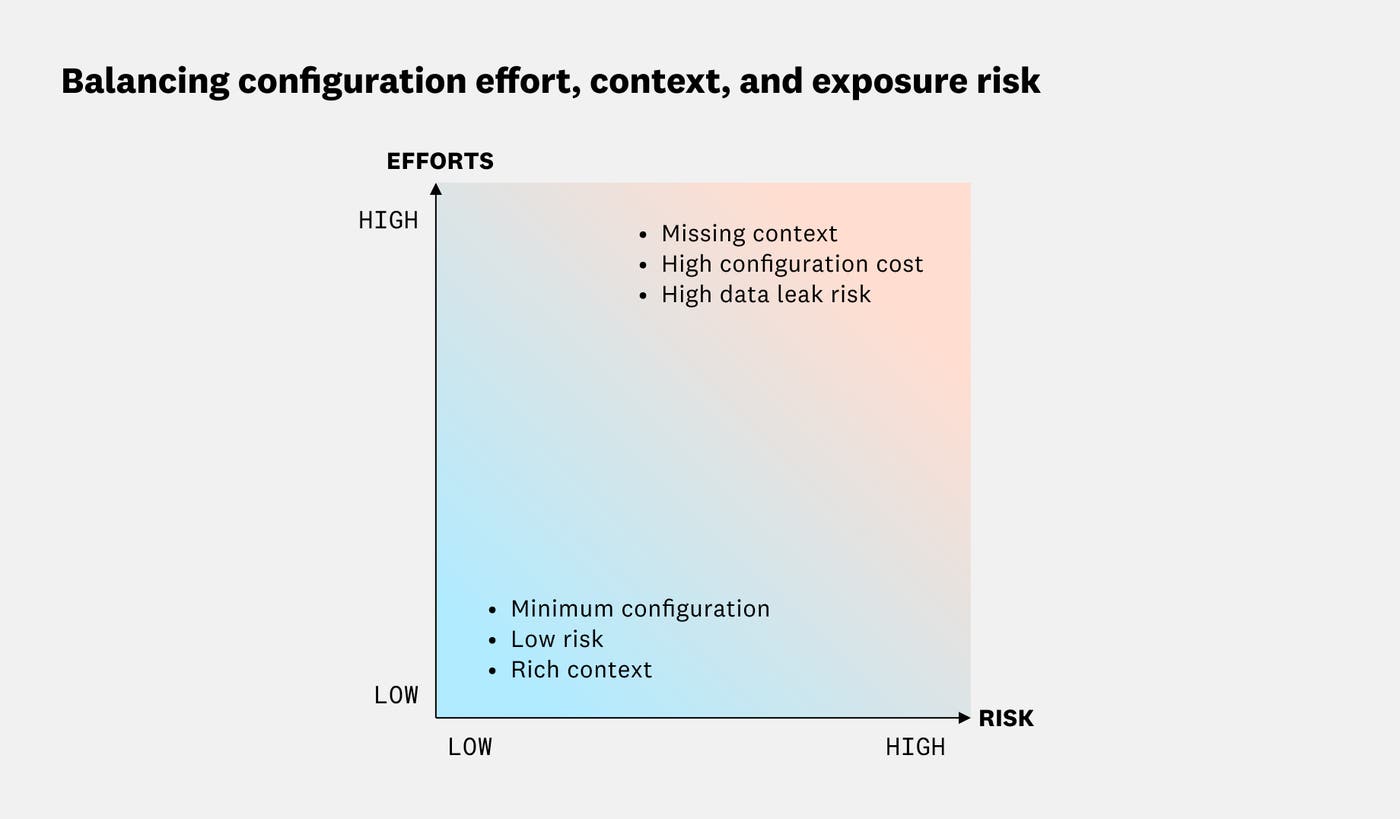
Conservative masking reduces the risk of capturing sensitive text, but it also disables reading the content of the DOM element. As a result, teams lose many of the contextual, human-readable action names that make RUM data easier to investigate. They must choose between conservative masking with less context and richer action names that require more configuration and oversight.
Build-time allowlisting provides another option by moving the verification step into the build pipeline. There, the plugin can distinguish fixed application text from values created at runtime. The approach is designed to meet three goals:
Reduce configuration errors: Instrumentation should remain conservative even when a developer misconfigures a privacy setting.
Keep observability useful: Static, nonsensitive text should remain available as human-readable action names.
Fit existing build workflows: Privacy checks should work in CI/CD pipelines and with common bundlers and loaders.
Configure build-time allowlisting
You can apply the privacy level across an application by changing the RUM Browser SDK configuration as follows:
{ defaultPrivacyLevel: 'mask-unless-allowlisted', enablePrivacyForActionNames: true}You can also apply the privacy level to only part of an application by setting the dd-privacy-level attribute to mask-unless-allowlisted on the relevant element. For more configuration details, see the RUM Browser SDK v7 privacy documentation.
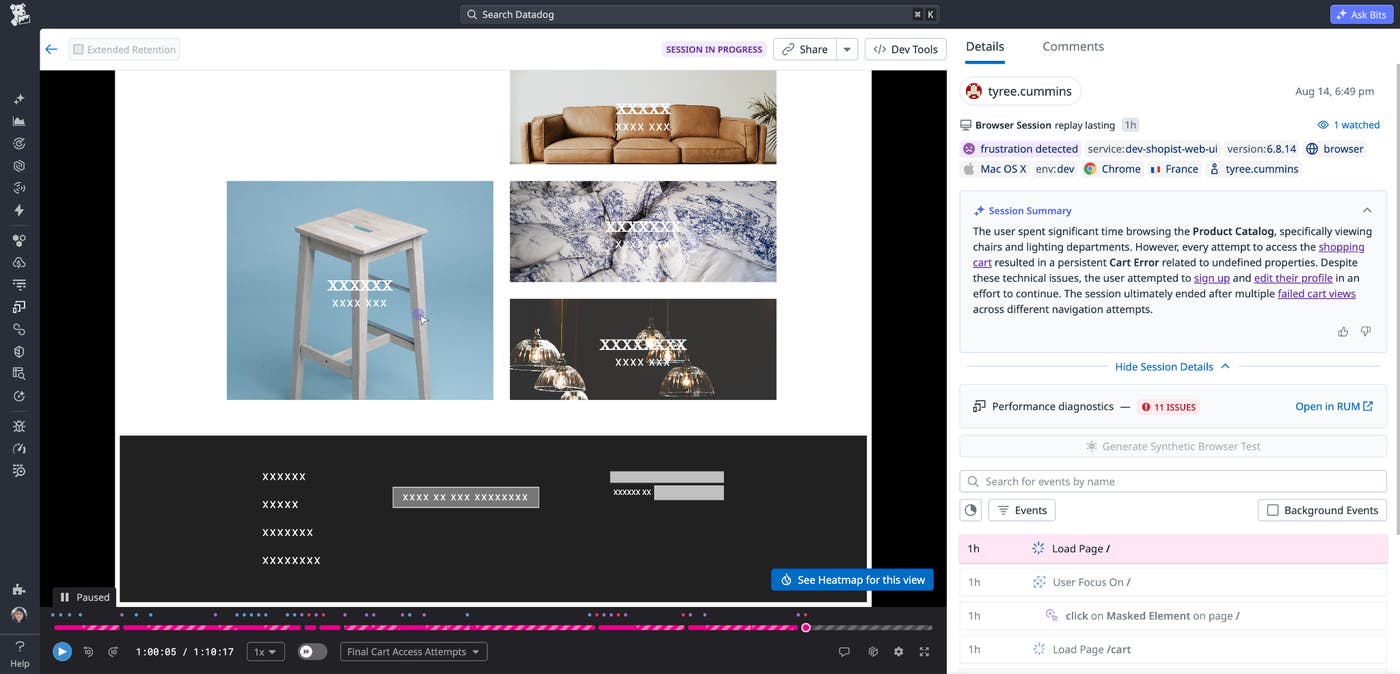
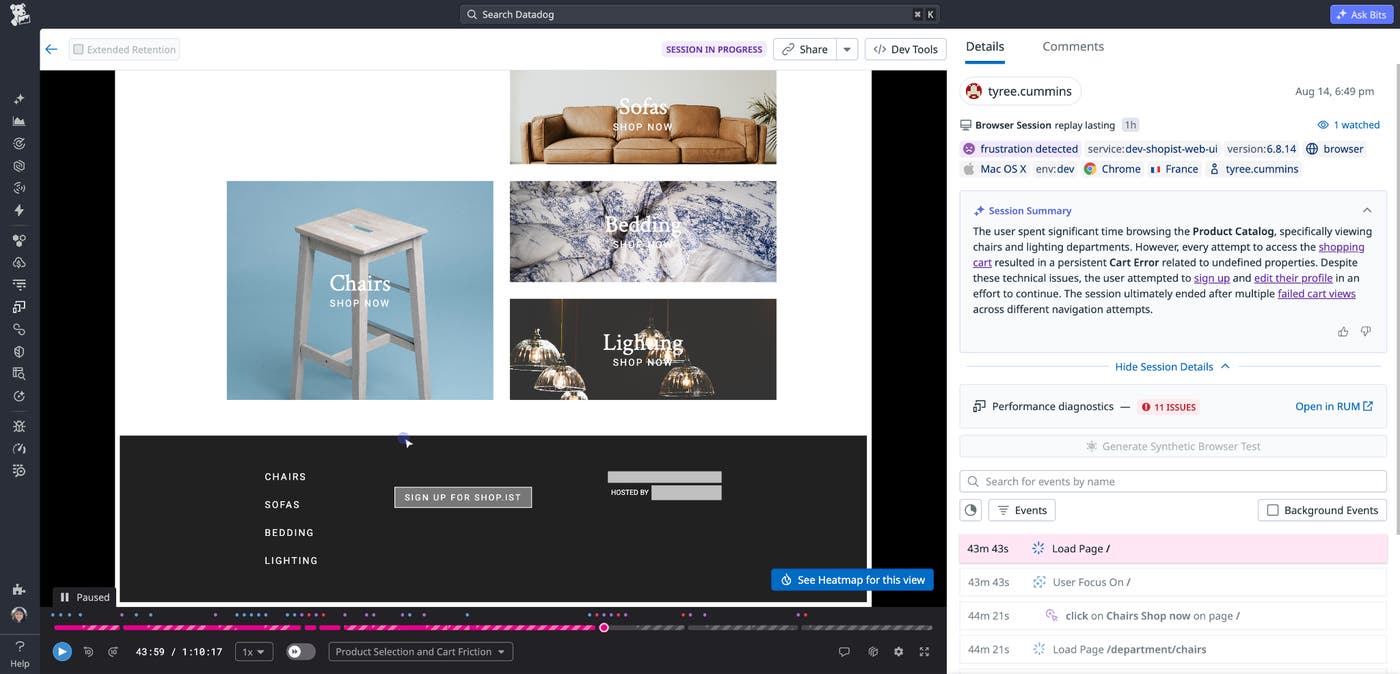
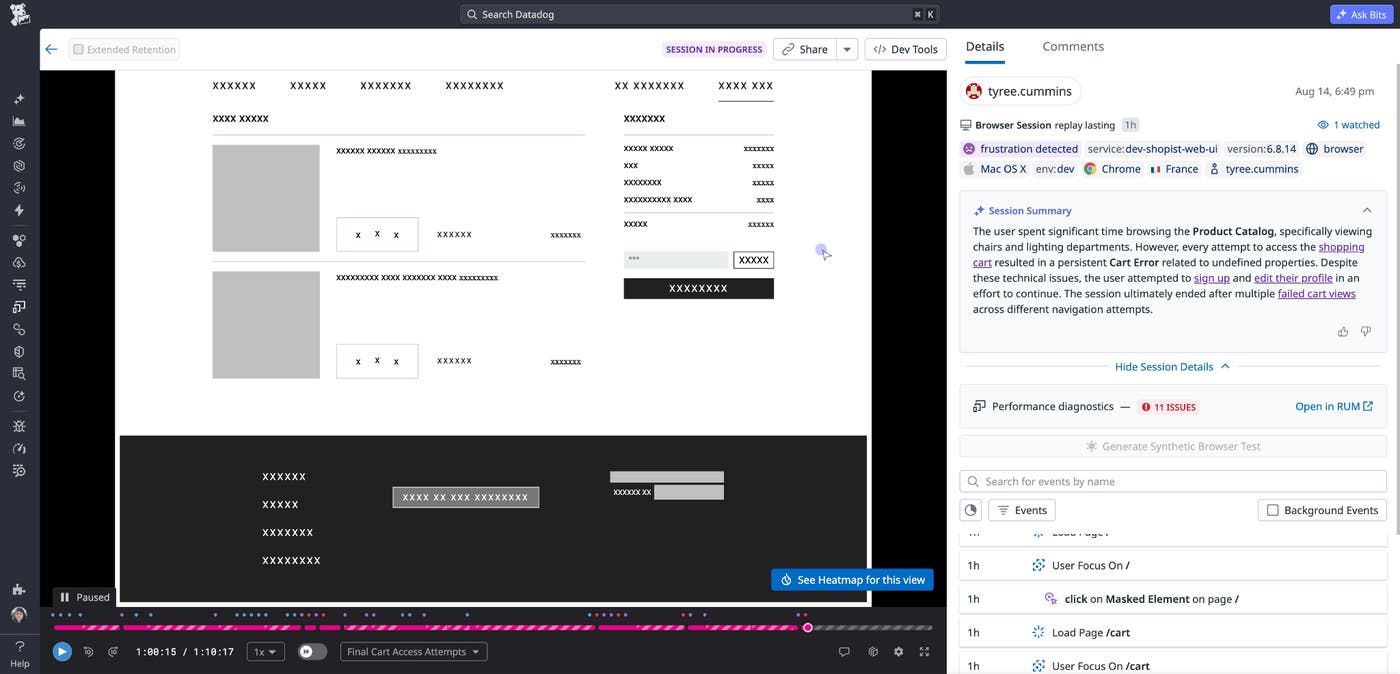
The mask-unless-allowlisted privacy level instructs the SDK to display text only when the build plugin has added that text to the allowlist. The SDK replaces other candidate text with the same fixed masking placeholder that Session Replay already uses.
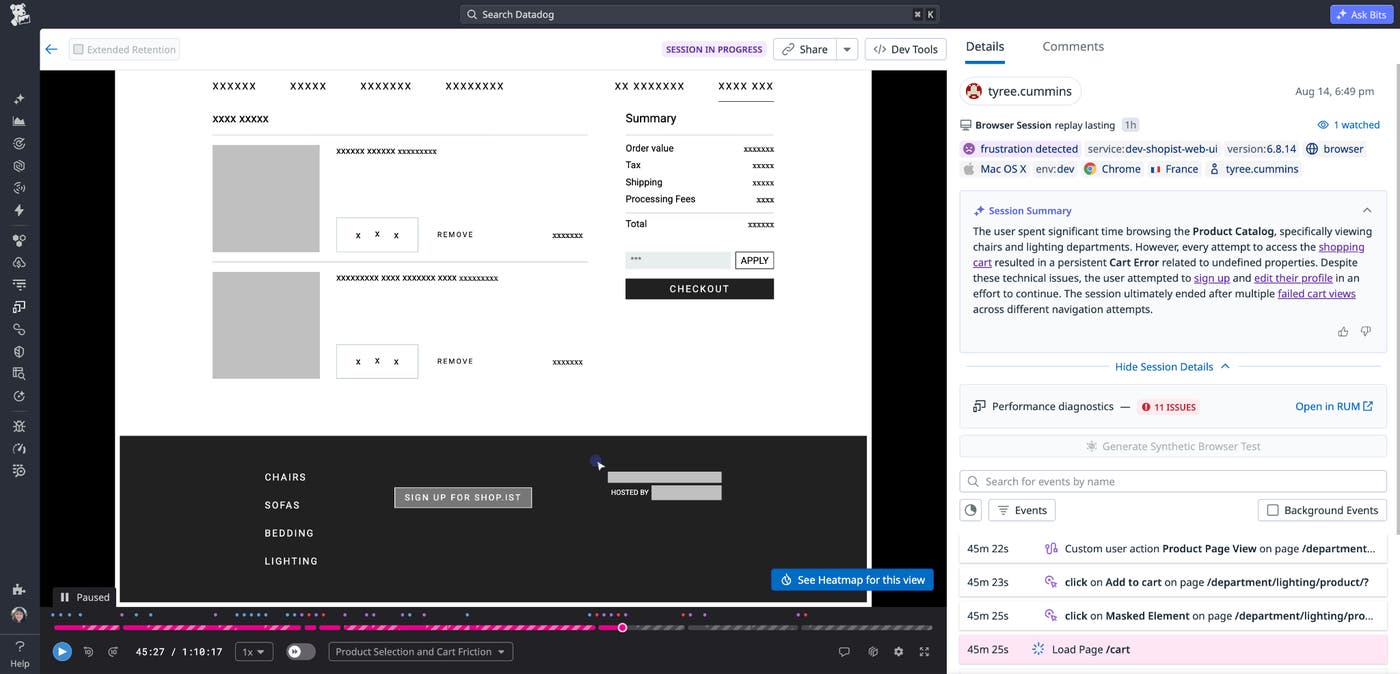
The following images depict a before-and-after Session Replay comparison showing an application with all text masked and the same application with allowlisted static text visible:
Automatically allowlist static text at runtime
The build plugin extracts fixed text while excluding dynamic expressions. Consider an application that renders an order label and a value calculated at runtime:
<div>Order value</div><div>${{ orderValue.toFixed(2) }}</div>At build time, the plugin extracts the fixed string Order value. It does not extract, store, or add the dynamic ${{ orderValue.toFixed(2) }} expression to the allowlist. At runtime, the SDK displays candidate action text only when it matches content that the plugin identified during the build. Unknown or runtime-constructed text remains masked.
For example, an action name based on the fixed label might remain readable as “Click on Order value”. An action name derived from a customer-specific value, such as “Click on $142.75”, would not match the build-time allowlist and would remain masked.
Build-time verification changes where the privacy decision happens. Instead of relying only on runtime attributes and developer configuration, the SDK uses an artifact produced from the application’s compiled code. Runtime-generated personally identifiable information (PII) does not qualify for the allowlist merely because it appears in an element’s text.
Both RUM and Session Replay check candidate text against the allowlist. When a string is absent from the allowlist, or an element requests a stricter privacy level, the SDK replaces the text with a fixed placeholder. The result is predictable behavior: readable action names for known static text and conservative masking for everything else.
The following images show a before-and-after checkout page with static labels such as “Order value” and “Checkout” visible while prices, addresses, and other runtime values remain masked:
Add privacy checks to your build pipeline
Behind the scenes, the privacy plugin walks compiled artifacts, including bundles and source maps, and extracts only static strings. It then creates an allowlist of tokens that the SDK can display in action names. Any candidate text that was not present in the build becomes a masked placeholder at runtime.
The plugin supports ESBuild, Rollup, Rspack, Vite, and Webpack, enabling teams to add allowlist generation to existing build workflows. Teams can upload the extracted allowlist alongside source maps or bundle artifacts as part of their CI/CD pipelines.
You can also control which content the plugin processes. Include and exclude patterns let you scope extraction to selected files, while special comments let you opt individual files or code blocks out of extraction. These controls help teams adapt the plugin to the structure and privacy requirements of their applications.
Because the plugin runs as part of the build, privacy verification happens before an application reaches users. The resulting allowlist connects what was statically present in the application code with what the SDK may reveal at runtime, making privacy checks part of the delivery pipeline rather than a separate audit step.
Preserve useful RUM context with build-time allowlisting
Build-time allowlisting helps teams preserve human-readable RUM action names without treating every runtime string as safe to display. The plugin extracts static text during the build, and the Browser SDK v7 uses that allowlist to mask unknown or dynamically generated content in RUM and Session Replay.
To get started, read the Datadog RUM Action Name Deobfuscation documentation, Datadog Browser SDK repo, and Datadog build plugin configuration examples.
To reduce exposure of sensitive data in your RUM sessions, sign up for a 14-day free trial.
