

Ellie Cohen

Eddie Cai
OVHcloud is a European cloud provider often used by organizations in regulated sectors like finance, healthcare, and public administration that need infrastructure and data residency within Europe. Most run OVHcloud as part of a multi-cloud estate. OVHcloud logs and metrics typically live outside the tools you use for the rest of your stack, which means investigations that cross cloud boundaries lose context when reaching OVHcloud.
Datadog’s OVHcloud integration connects OVHcloud to the same observability platform as the rest of your infrastructure. The integration collects logs from OVHcloud Logs Data Platform (LDP) and surfaces them in Datadog Log Management for centralized search, alerting, and analysis.
In this post, you’ll learn how to:
Centralize OVHcloud logs in Datadog Log Management
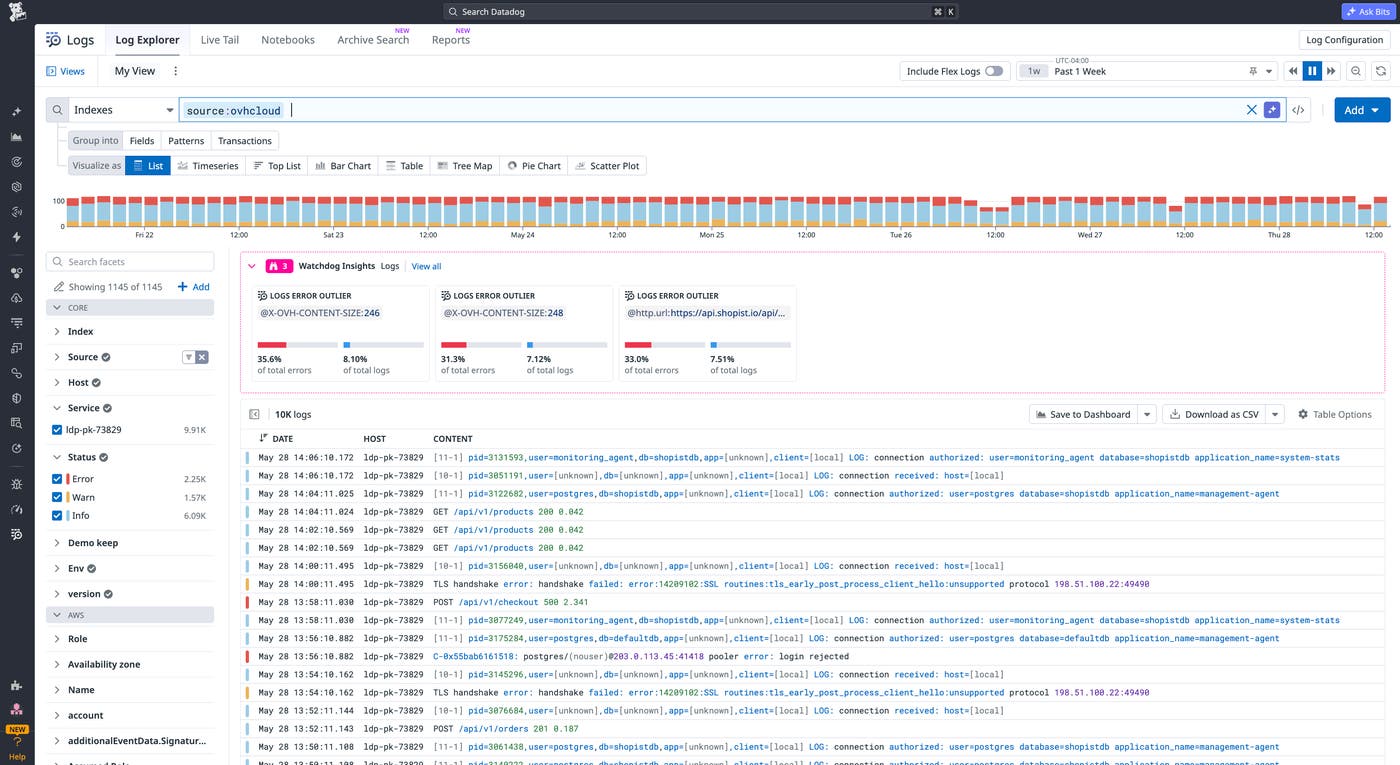
Logs from your OVHcloud infrastructure capture the audit trails, access policy results, and application activity that anchor most incident investigations. When something breaks, those logs are the starting point. Investigations that cross cloud boundaries stall when OVHcloud logs live in a separate system.
OVHcloud’s Logs Data Platform (LDP) is a managed service for collecting and querying logs from your OVHcloud environment. You can configure your OVHcloud services to forward logs to LDP, and the Datadog integration pulls from each configured stream. The integration ingests any logs that have been forwarded to LDP, including account audit logs, activity logs, IAM policy verification results, Kubernetes audit logs, managed database logs, load balancer access logs, and application logs from your own workloads.
Every event arrives in Datadog Log Management with consistent tagging, including ddsource:ovh-cloud, a service tag set to the LDP service name, and an alias tag identifying the OpenSearch alias the event came from. For organizations in regulated industries that depend on OVHcloud for data residency, the audit trails and access logs needed for compliance reporting are queryable in the same place as the rest of your observability data.
For example, if an application on OVHcloud starts returning errors, filter your Datadog log search by time range to find the first affected request. Because those logs are co-located with data from other cloud providers, you can also check whether a dependency hosted elsewhere contributed to the problem.
Collect metrics and traces from OVHcloud instances
Pinpointing the root cause behind a log error requires host metrics and distributed traces. Install the Datadog Agent on your OVHcloud instances to collect host metrics, Application Performance Monitoring (APM) traces, and container monitoring data from each host.
Investigate latency and errors with Datadog APM
Datadog APM captures distributed traces across every service running on your OVHcloud instances. The service map shows which services depend on each other and whether latency in one is propagating to downstream services. APM tracks error rates and latency percentiles (p50, p95, p99) per service, so you can catch degraded endpoints early.
Say you notice elevated latency on a service hosted on OVHcloud. You open a flame graph in APM to identify slow spans. From there, pivot to the logs associated with that trace. APM, logs, and host metrics are all in Datadog, so the investigation moves from the first signal to root cause without switching tools.
Monitor container health and resource usage
For containerized workloads on OVHcloud, the Datadog Agent collects per-container CPU usage, memory consumption, and restart counts. Restart count is a particularly useful signal, since a container restarting frequently typically indicates an application crash, an out-of-memory (OOM) kill, or a failed health check. Tracking resource usage against configured limits helps you identify containers approaching their limits before they affect your services.
If a service on OVHcloud starts returning intermittent errors, check the container restart count. A climbing restart count alongside memory usage that peaks and drops repeatedly suggests an OOM kill. You can then resolve this by adjusting the container memory limits.
Get immediate visibility with out-of-the-box (OOTB) monitoring
Dashboards and monitors convert raw telemetry data into something actionable. A dashboard surfaces the right signals without requiring you to build queries from scratch each time. A monitor fires before anyone has to check manually.
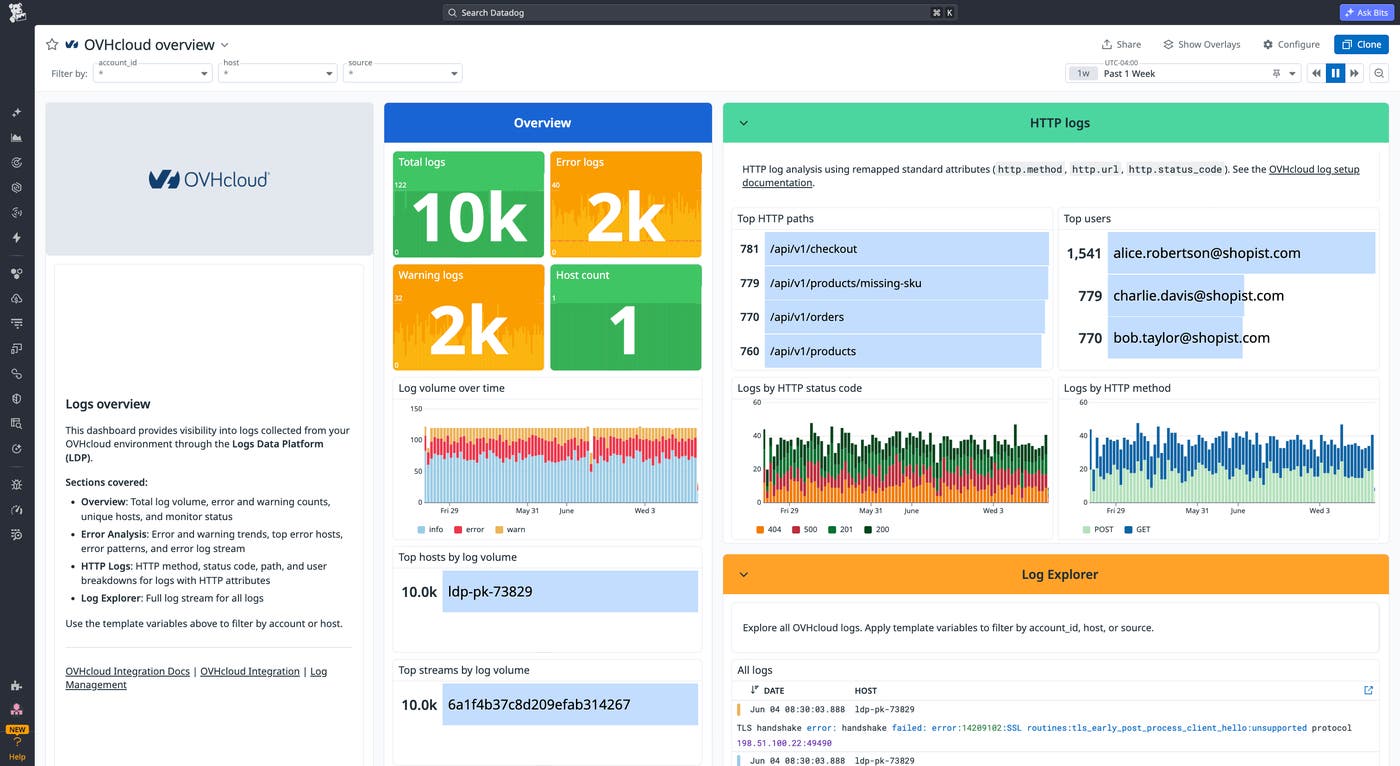
The overview dashboard surfaces total log volume, error and warning counts, host count, log volume over time, and top hosts and streams by volume across your OVHcloud environment. A separate HTTP logs section breaks events down by status code, method, top paths, and top users using Datadog’s remapped HTTP attributes, and an error analysis section highlights error trends, top error hosts, and recurring error patterns.
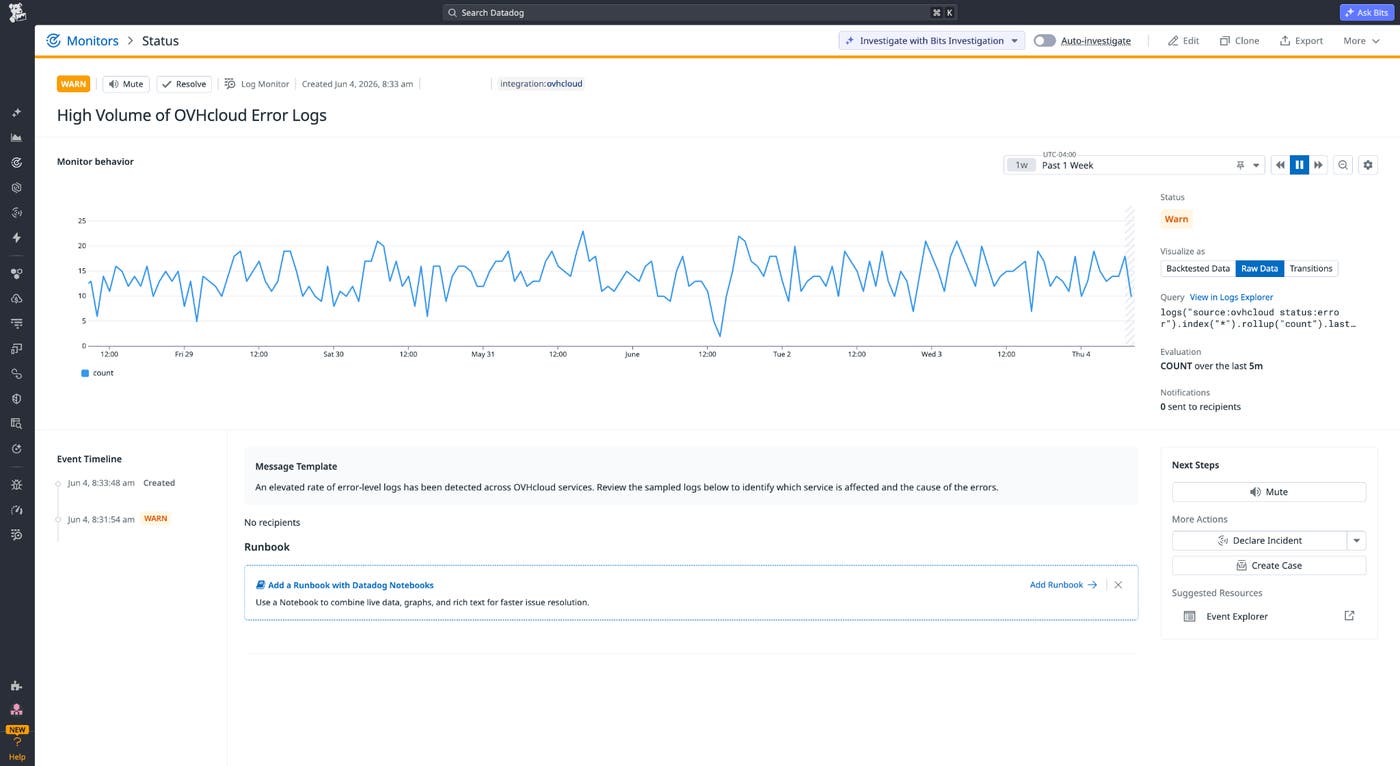
Three prebuilt monitor templates ship with the integration. They fire on a spike in HTTP error rates, an elevated error log count, and a high count of critical severity logs. Enable each template and adjust thresholds to match your environment, rather than defining every condition from scratch.
If you also run the Datadog Agent on your OVHcloud instances, the Agent automatically collects host-level metrics including CPU usage, memory consumption, disk I/O, and network throughput. These appear in Datadog’s default host detail pages and host dashboard with no configuration required, giving you both infrastructure and application visibility in the same view.
Get started with OVHcloud monitoring in Datadog
The Datadog integration for OVHcloud monitoring brings European cloud infrastructure into the same observability platform you use for the rest of your multi-cloud environment. Log collection through OVHcloud Logs Data Platform, metrics and traces via the Datadog Agent, and OOTB dashboards and monitors give you consistent visibility across all your cloud providers. For organizations that depend on OVHcloud, this integration extends Datadog coverage to their OVHcloud infrastructure.
If you don’t already have a Datadog account, sign up for a free 14-day trial to get started monitoring OVHcloud.
