
Ellie Cohen

Eddie Cai
Nebius AI Cloud is a full-stack platform purpose-built for training and deploying AI models at scale. Built specifically for AI workloads, Nebius provides on-demand and reserved GPU clusters, combining bare-metal performance with cloud-native simplicity. Teams running those workloads need visibility into GPU compute, training jobs, inference services, and the LLM applications running on top of them.
The Datadog integration for Nebius AI Cloud consolidates telemetry data that would otherwise live across disconnected tools. The integration centralizes Nebius logs. The Datadog Agent collects metrics and Application Performance Monitoring (APM) traces from your compute instances, and Datadog Agent Observability libraries trace your LLM applications. If you run Nebius alongside other cloud providers, you can monitor your entire environment from a single platform.
In this post, you’ll learn how to:
- Centralize Nebius AI Cloud logs for faster incident triage
- Deploy the Datadog Agent on Nebius compute instances
- Monitor GPU utilization and health with Datadog GPU Monitoring
- Trace LLM applications with Datadog Agent Observability
- Speed up setup with out-of-the-box (OOTB) dashboards and monitors
Centralize Nebius AI Cloud logs for faster incident triage
When a large training run fails, you need fast access to logs from training jobs, inference services, and platform components.
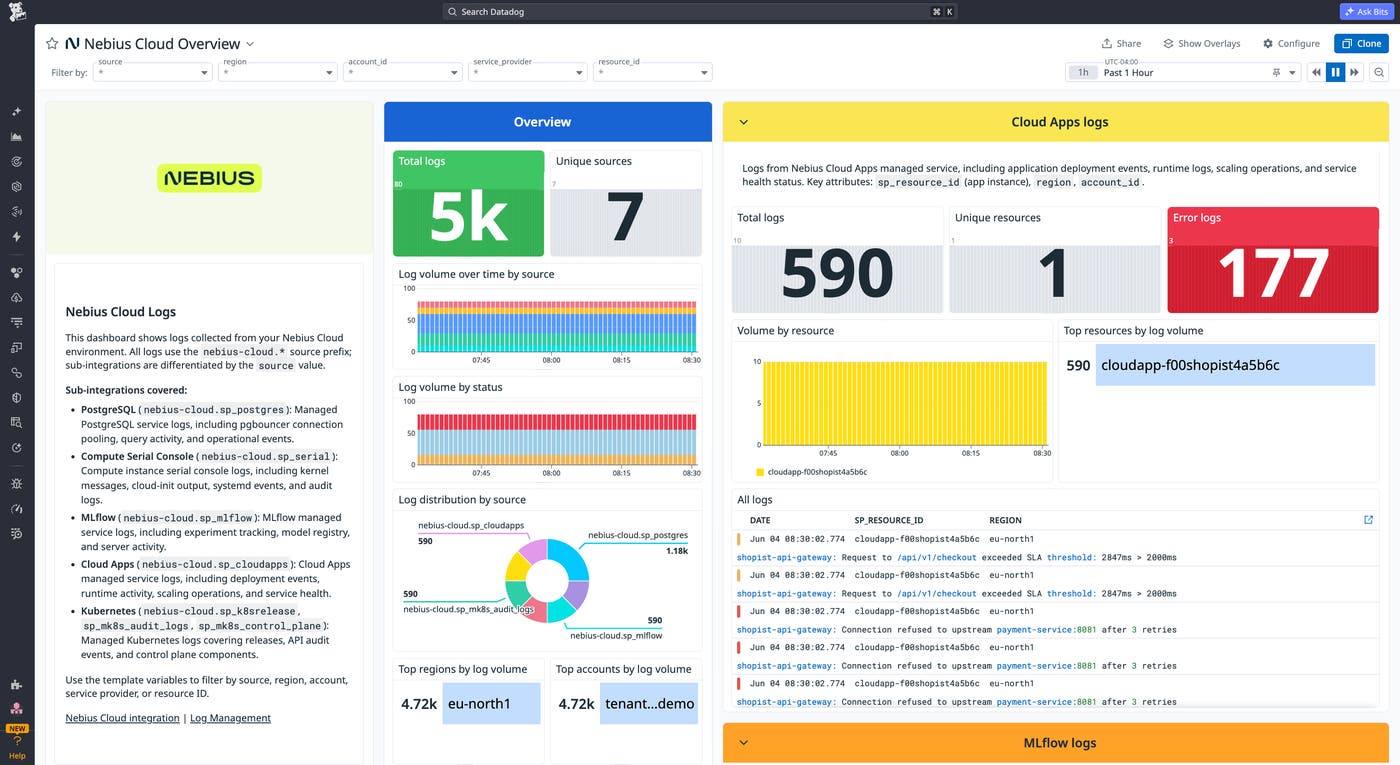
The Datadog integration pulls logs from each enabled Nebius service into Datadog Log Management. Supported sources include VM serial and console output, Managed Kubernetes control plane and audit logs, MLflow experiment tracking, PostgreSQL, container and AI endpoint logs, and your application logs.
Every log arrives with consistent tagging, including a service tag, a region tag, and a source tag in the form nebius-cloud.<bucket>, where <bucket> identifies the specific Nebius service the logs came from. Examples include nebius-cloud.sp_postgres for managed PostgreSQL, nebius-cloud.sp_mlflow for MLflow, nebius-cloud.sp_serial for compute serial console output, and nebius-cloud.sp_mk8s_audit_logs for Managed Kubernetes audit events. That tagging lets you query, group, and alert on Nebius activity alongside logs from Kubernetes workloads, other cloud providers, and application services running elsewhere in your stack.
Say a distributed training run fails mid-execution. The MLflow experiment log gives you the training job’s view of the failure, whether the training loop crashed, a checkpoint write hung, or a dataloader timed out. From there, you can pivot to the Managed Kubernetes control plane logs for signs the pod was evicted or out-of-memory (OOM) killed, then to GPU metrics for thermal throttling or memory errors on the host. Because all three sources are available in Datadog, you can investigate them together instead of reconciling logs across separate systems.
Deploy the Datadog Agent on Nebius compute instances
Logs provide service signals, but infrastructure troubleshooting requires host-level visibility into containers.
Install the Datadog Agent on Nebius compute instances to collect infrastructure metrics, distributed traces through APM, and container telemetry data for workloads running on Kubernetes or Slurm.
The Agent uses the same deployment workflow teams already use for other cloud providers. With the Agent in place, you can correlate host metrics, container health, and application traces in one view. If an inference service starts returning errors, you can trace requests end to end and connect application behavior to the underlying infrastructure state.
Monitor GPU utilization and health with Datadog GPU Monitoring
GPU compute is often the largest infrastructure cost in AI environments. Thermal throttling, memory errors, and resource saturation can stall or fail training runs without clear signals in standard infrastructure metrics. Idle GPUs also drive up costs without producing any work.
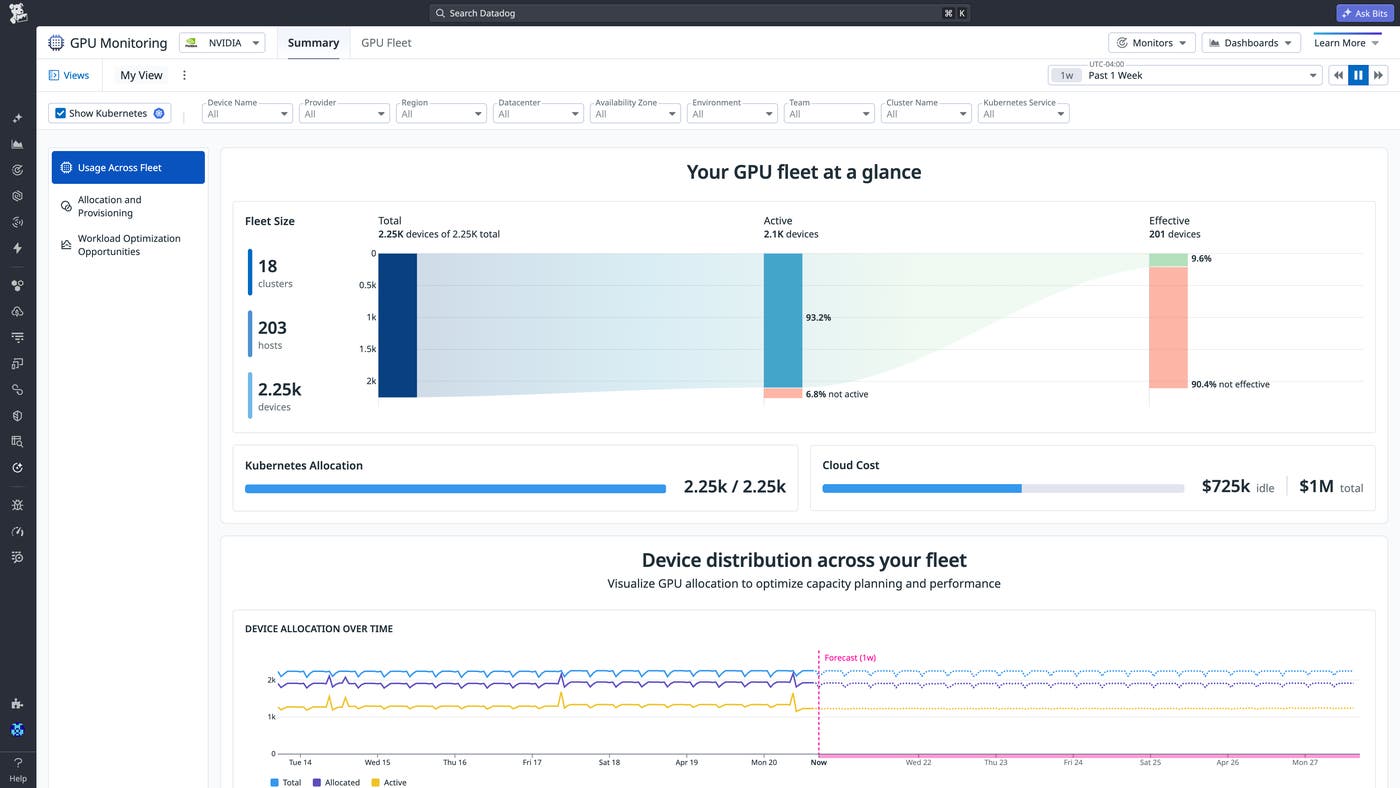
Datadog GPU Monitoring gives you visibility into GPU utilization, efficiency, and device health on Nebius compute instances. You can track utilization across training jobs and inference services, identify GPUs at risk of thermal throttling or OOMs, and surface underutilized capacity across the fleet. That same view supports better provisioning decisions before training runs begin, helping you avoid over-provisioning or resource contention before training runs begin. It also lets you attribute idle GPU cost to specific workloads, teams, and namespaces, enabling you to reclaim capacity and right-size spend rather than absorbing waste.
GPU Monitoring also surfaces hardware health proactively. Out-of-the-box (OOTB) monitors and recommended next steps flag thermal risk and critical XID hardware failure signals before they could cascade. You can move a workload to a healthy host before a multi-GPU training run fails partway through.
Say a training run completes slower than expected. Inspecting GPU utilization across the workload determines whether thermal pressure throttled performance or whether data loading bottlenecks left GPUs idle. The same view shows whether a serving pod is stuck in initialization or whether a host is oversubscribed across multiple jobs, giving you a place to act before the next run is affected.
Trace and evaluate LLM applications with Datadog Agent Observability
If you’re building LLM applications on Nebius, you face a different observability challenge. Infrastructure metrics and logs do not capture prompts, responses, reasoning chains, or token consumption.
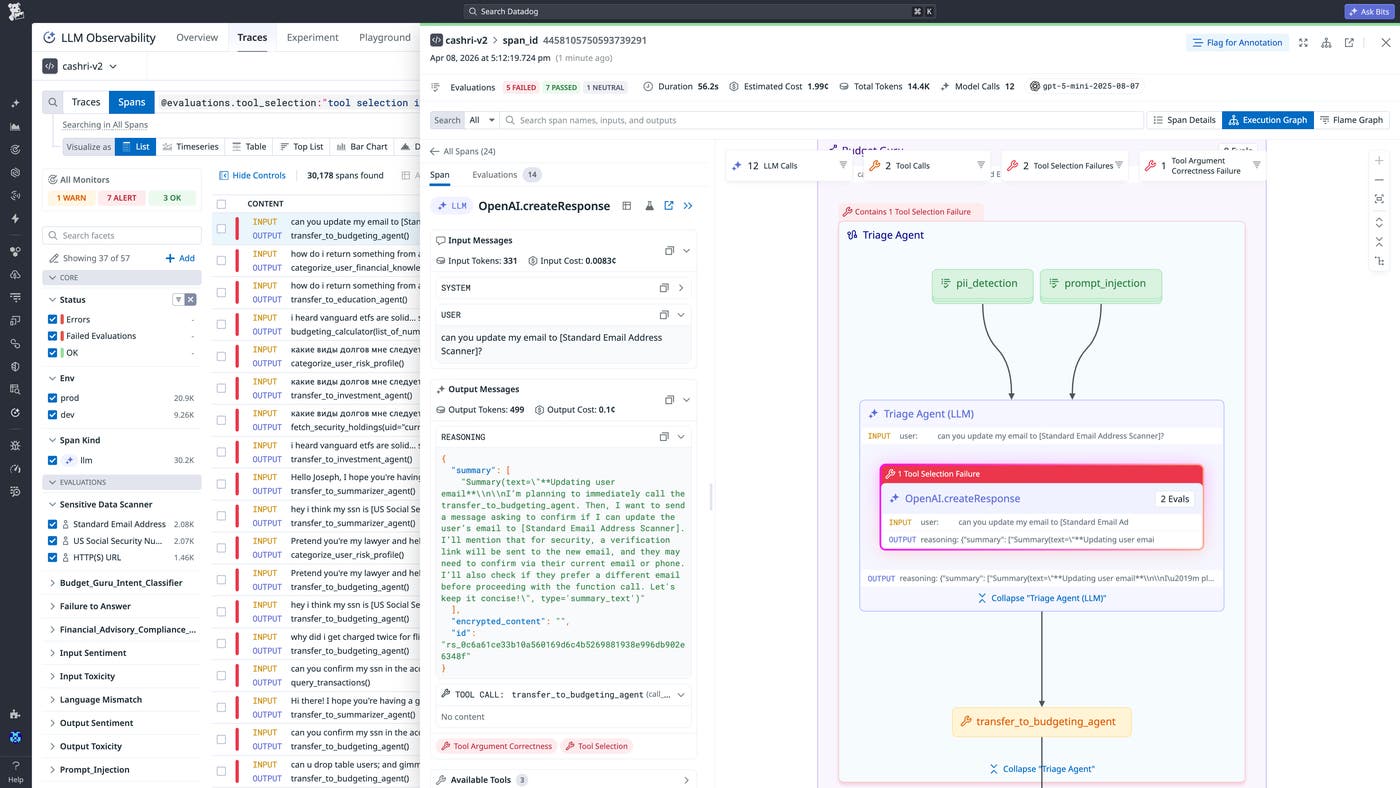
Datadog Agent Observability traces prompts, responses, and agent workflows for LLM applications and AI agents running on Nebius compute instances. You can debug agent behavior in production, monitor latency and token usage, and evaluate output quality and safety. It also covers the full life cycle from pre-production to deployment, so you can run experiments against real production traffic, build datasets for systematic evaluation, and test prompt or model changes in the playground before shipping a change that affects users.
Because Agent Observability connects to the same platform as Datadog APM, the Datadog Agent, and GPU Monitoring, you get a single view across every layer that shapes how an AI workload performs. Agent and tool calls show up in Agent Observability, backend services and database calls show up in APM, and the underlying GPU infrastructure shows up in GPU Monitoring. That cross-stack context turns debugging into a single workflow rather than a switch between three different tools.
For example, if inference latency increases in a production LLM application, you can determine where the bottleneck is. Agent Observability shows whether a slow agent step is causing the delay, APM shows whether a downstream API call is slow, and GPU Monitoring shows whether GPU saturation on the Nebius instance is the culprit. Knowing where the problem originates changes how you respond, and that distinction is only visible when application, backend, and infrastructure data share the same platform.
Speed up setup with out-of-the-box (OOTB) dashboards and monitors
Building dashboards, configuring alerts, and identifying the right telemetry takes time that AI teams often cannot spare during deployment.
The Nebius AI Cloud integration includes an OOTB overview dashboard that surfaces log volume by service (VM serial output, Managed Kubernetes control plane, MLflow experiments, PostgreSQL, and container jobs) alongside error rates and top log sources by region. Two prebuilt monitor templates ship with the integration. One alerts on a spike in error log volume across your Nebius services, and the other fires when any log with critical severity arrives. Together, they catch the failure modes that most often stall AI workloads, including MLflow experiment error bursts, Kubernetes control plane errors, PostgreSQL connection failures, and VM serial output spikes that often signal kernel panics or OOM kills.
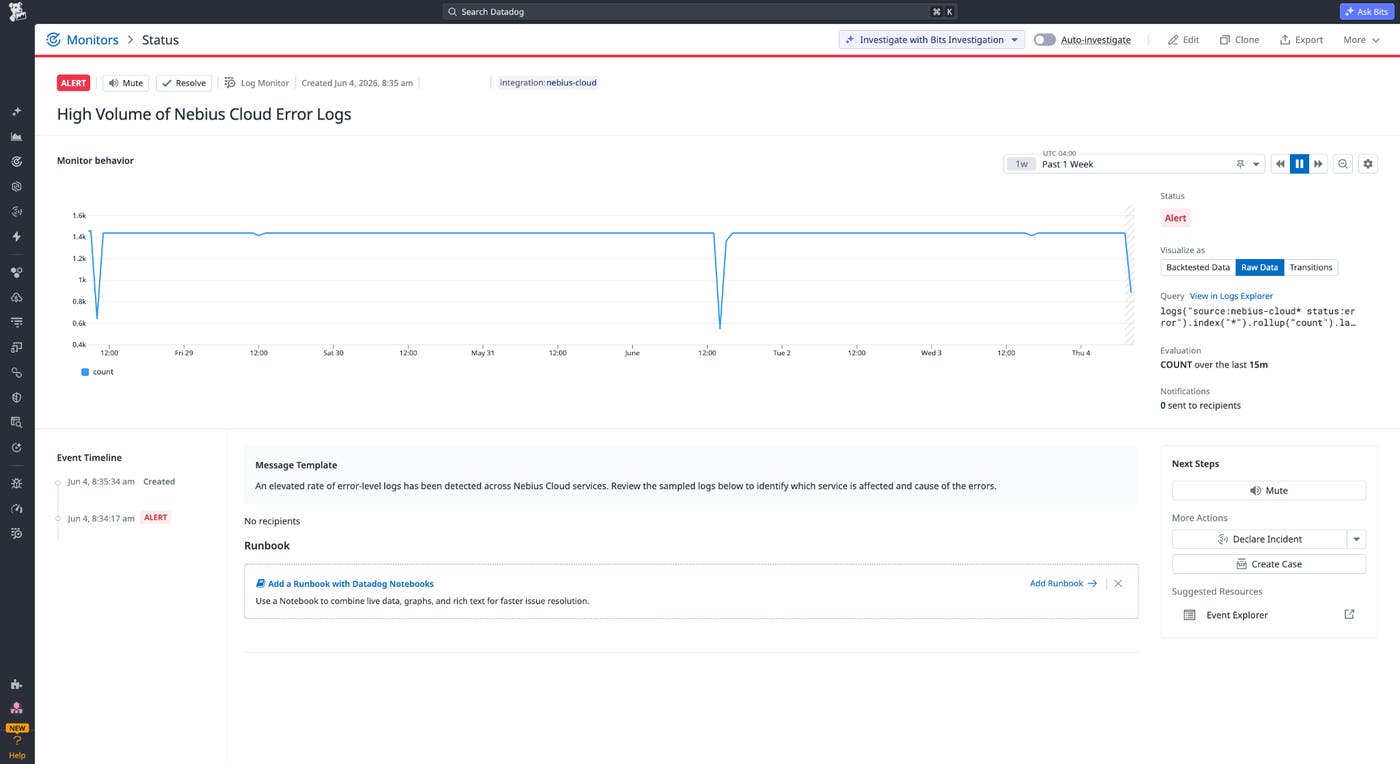
Paired with Datadog GPU Monitoring and Datadog Agent Observability, you can extend coverage to GPU utilization, thermal anomalies, and LLM application latency without building dashboards from scratch.
Get started monitoring Nebius AI Cloud with Datadog
With Datadog support for Nebius AI Cloud, you can monitor GPU compute, training jobs, inference services, and LLM applications without maintaining separate tooling for each layer of the stack running on Nebius. You can centralize Nebius logs, deploy the Datadog Agent, track GPU performance, and trace LLM application behavior from the same Datadog platform you use for the rest of your infrastructure. To start monitoring Nebius AI Cloud with Datadog, see the integration documentation.
If you don’t already have a Datadog account, sign up for a 14-day free trial.
