

Alex Barksdale
Senior Software Engineer

Miguel Tulla Lizardi
Software Engineer

Zhengda Lu
Senior Software Engineer
Improving an AI agent means knowing which behaviors to change and where those changes will have the greatest impact. Insights in Datadog Agent Observability improves AI agents by analyzing agent traces to identify recurring cost and reliability problems. It then explains the causes of those problems, assesses their impact, and recommends fixes backed by evidence.
At Datadog, we use Insights to improve the agent behind Insights. That is, Insights shows us why the agent spends more tokens than necessary or fails to complete a task. We then use that evidence to decide what to change. In this post, we’ll give examples of how we use Insights in Agent Observability to:
Identify opportunities to reduce agent costs
Recently, Agent Observability helped us identify two patterns in our agent’s traces that pointed to opportunities to reduce costs.
Tools can return more content than the agent needs
Our agent uses search_llmobs_spans to find evidence in recorded traces. When it searches too broadly, the tool can return more content than the model needs. If those results enter the conversation unchanged, the agent sends that extra content to the model again in later requests.
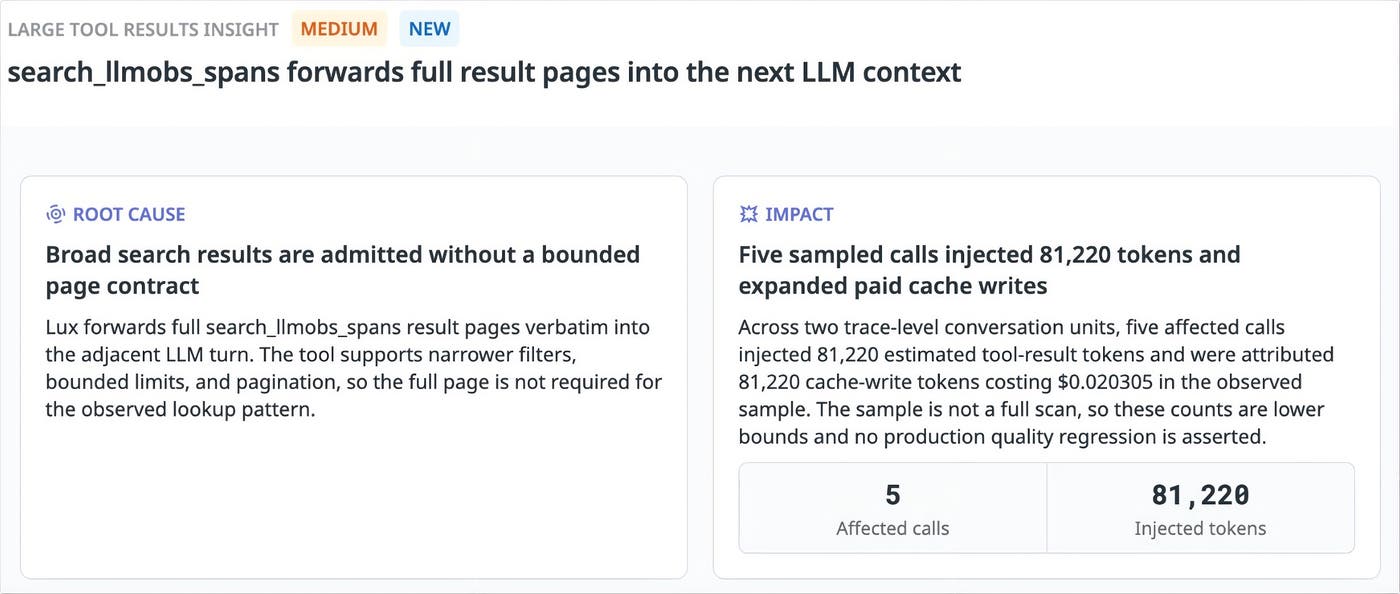
One insight showed that five search calls across two agent runs returned roughly 80,000 tokens of content that was then included in model requests. One result contributed 19,000 tokens to a subsequent request with 97,000 input tokens. (These counts describe the requests we inspected, not the savings we achieved.)
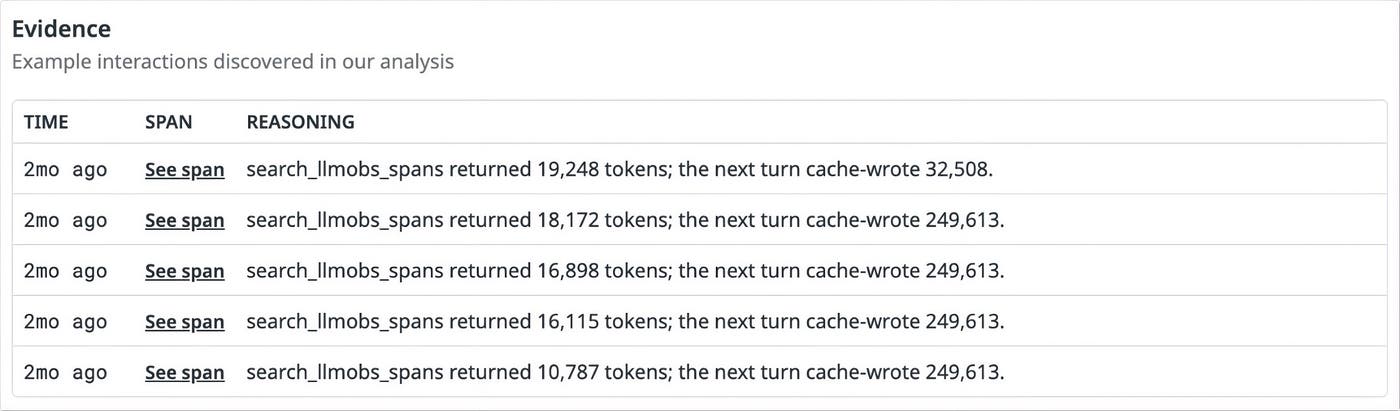
Here, Datadog recommends narrowing filters, requesting smaller result pages, and retrieving more content only when needed. In this example, when the behavior recurred after the original finding was resolved, a later insight recommended compact previews. The agent could then retrieve full span content when it needed more detail.
Previews must retain the identifiers needed to retrieve relevant evidence. To validate a fix, we replay the affected investigations and compare how much content the tools return, how many tokens the model uses, and how well the agent answers. Using fewer tokens helps only if the agent still investigates correctly and completely.
Changing context can prevent the agent from reusing cached input
Prompt caching lets a provider reuse work from processing instructions and tool definitions sent in earlier requests. This can reduce the cost of processing the same content again. To benefit, requests need to begin with matching content, called a shared prefix. (To learn more, see our blog post on monitoring prompt caching.)
One production insight revealed that information specific to each task appeared before the tool definitions. If that information changed, the provider couldn’t reuse work when processing the otherwise unchanged content that followed. Instead, similar requests repeatedly wrote nearly the entire prompt to the cache.
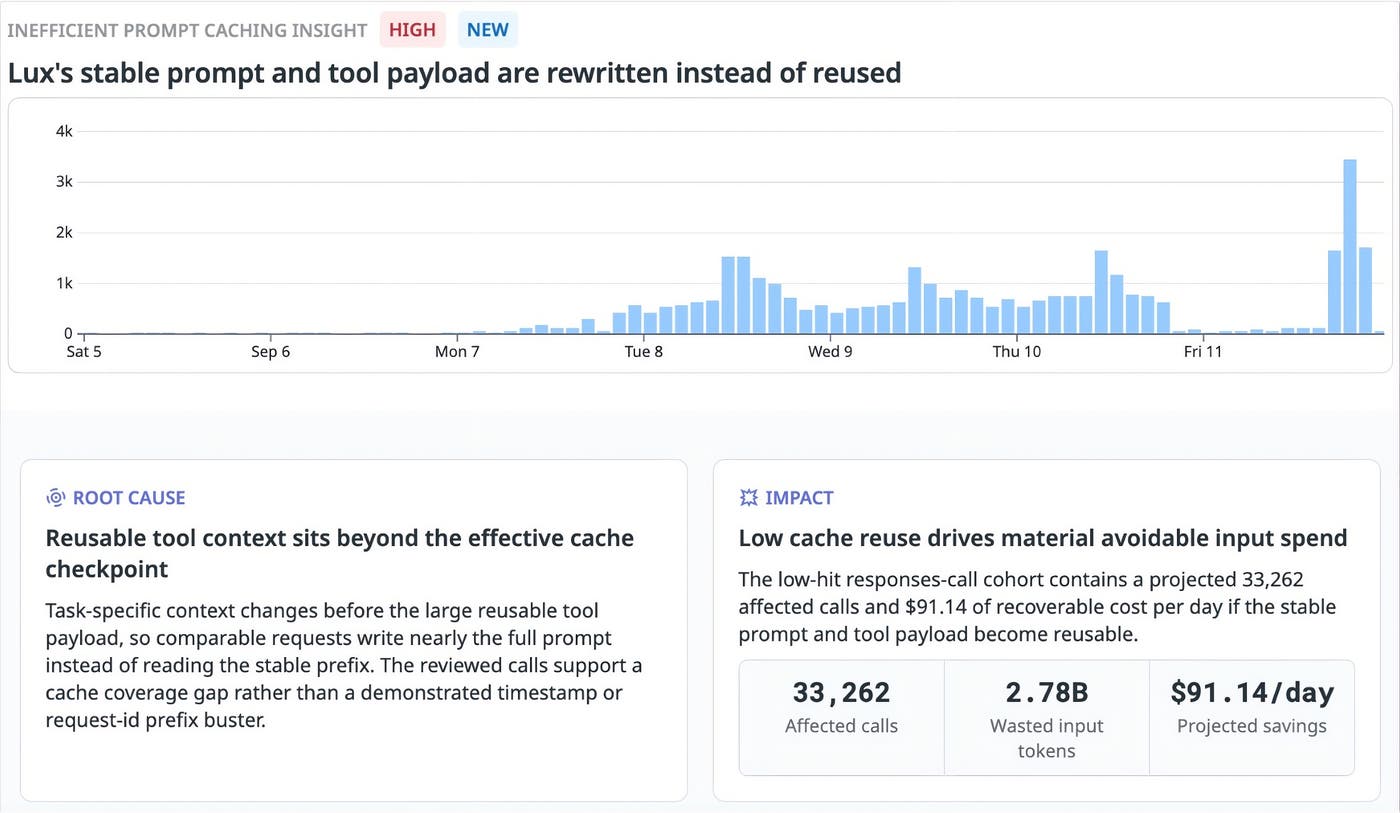
The chart shows how often requests reused cached input for less than 20% of their input tokens. It includes requests with more than 1,024 input tokens for the selected model and provider, helping us identify periods to investigate.
In this example, Datadog estimated that making the repeated instructions and tool definitions reusable could save about $2,734 per month. That projection applies $91.14 in estimated daily savings over 30 days to the requests analyzed. (Note that we haven’t measured those savings. The actual amount saved depends on how often requests reuse cached input, whether they qualify for caching, and how much the provider charges.)
Datadog recommended that we change how our agent builds requests by placing stable system instructions and tool definitions before task-specific details and conversation content. Keeping the beginning of requests consistent could let the provider reuse work it had already done.
Investigate failures in the agent’s tool calls
Insights in Agent Observability also identifies why our agent’s tool calls fail. In one case, the agent repeatedly sent a request with missing information. In another, it requested resources by using names that its tools couldn’t recognize.
The agent can repeat calls with missing arguments
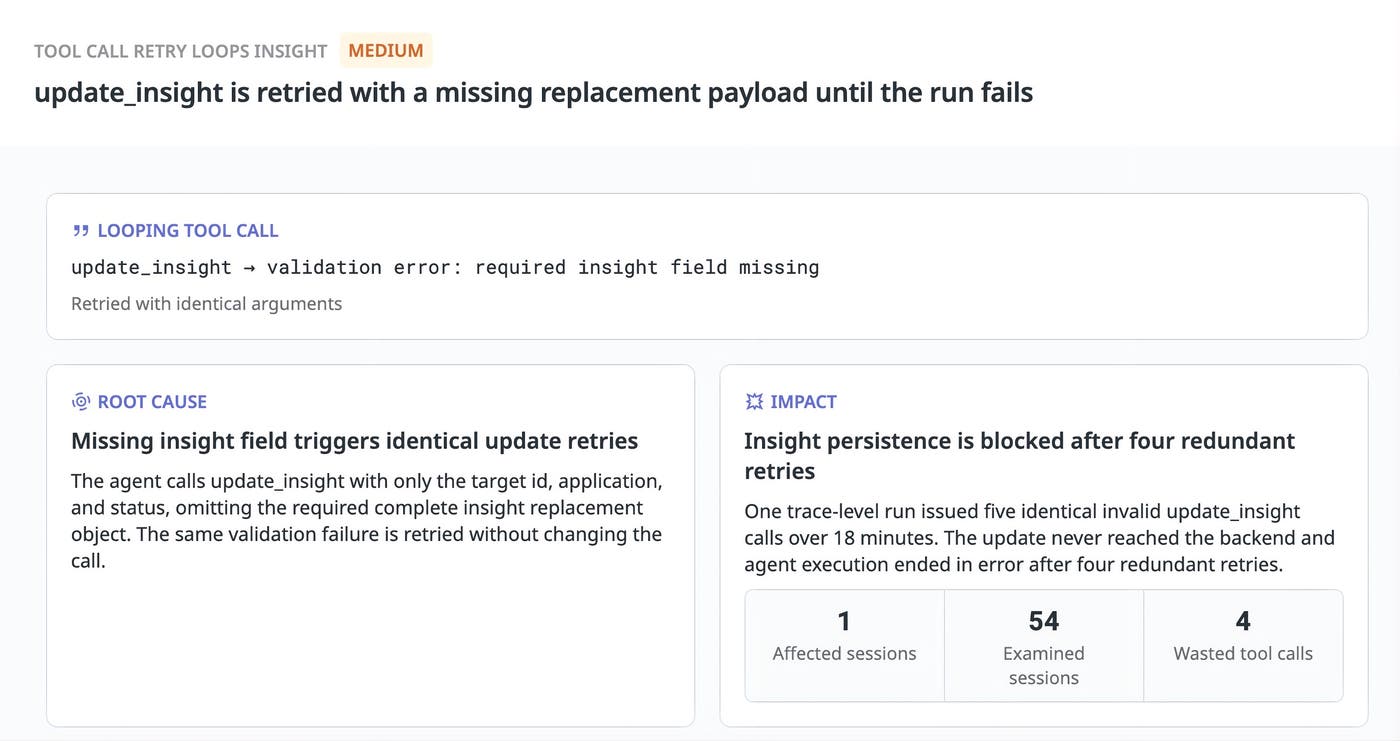
One insight revealed that the agent made five identical invalid calls to update_insight over approximately 18 minutes. The agent supplied an identifier, application, and status, but left out the complete insight object required to replace the existing one.
The tool rejected each call because required information was missing. None reached the backend, and the run ended in error after four retries. Repeating the same request couldn’t resolve the problem. The agent needed to supply the missing information before trying again.
The agent can request resources that aren’t available
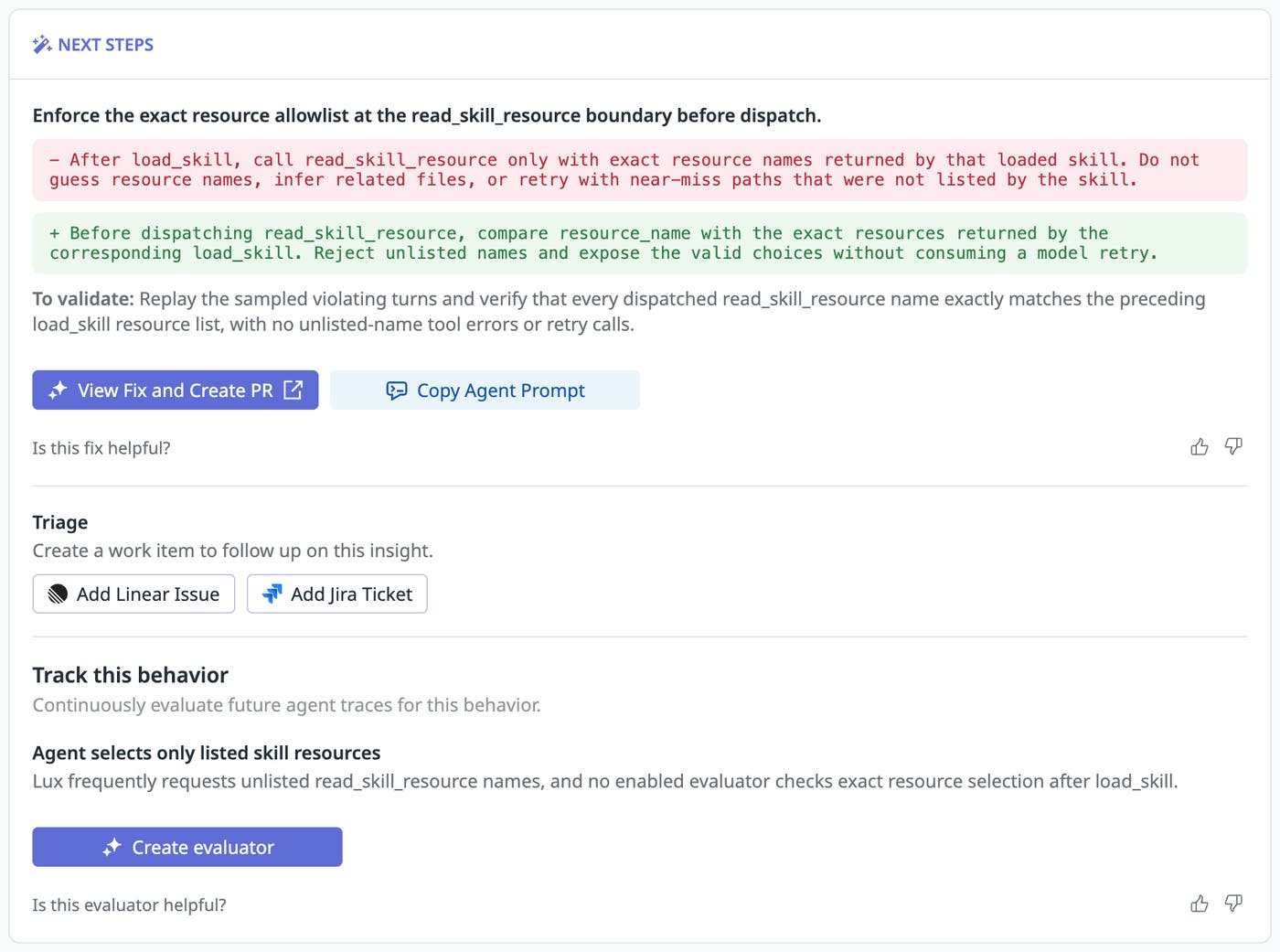
Our agent’s instructions require it to use the exact resource names returned by its skill loader. An insight revealed that the agent guessed or changed those names across 193 sessions in the sample. The tool couldn’t find the requested resources, so the calls failed and delayed the agent’s investigations.
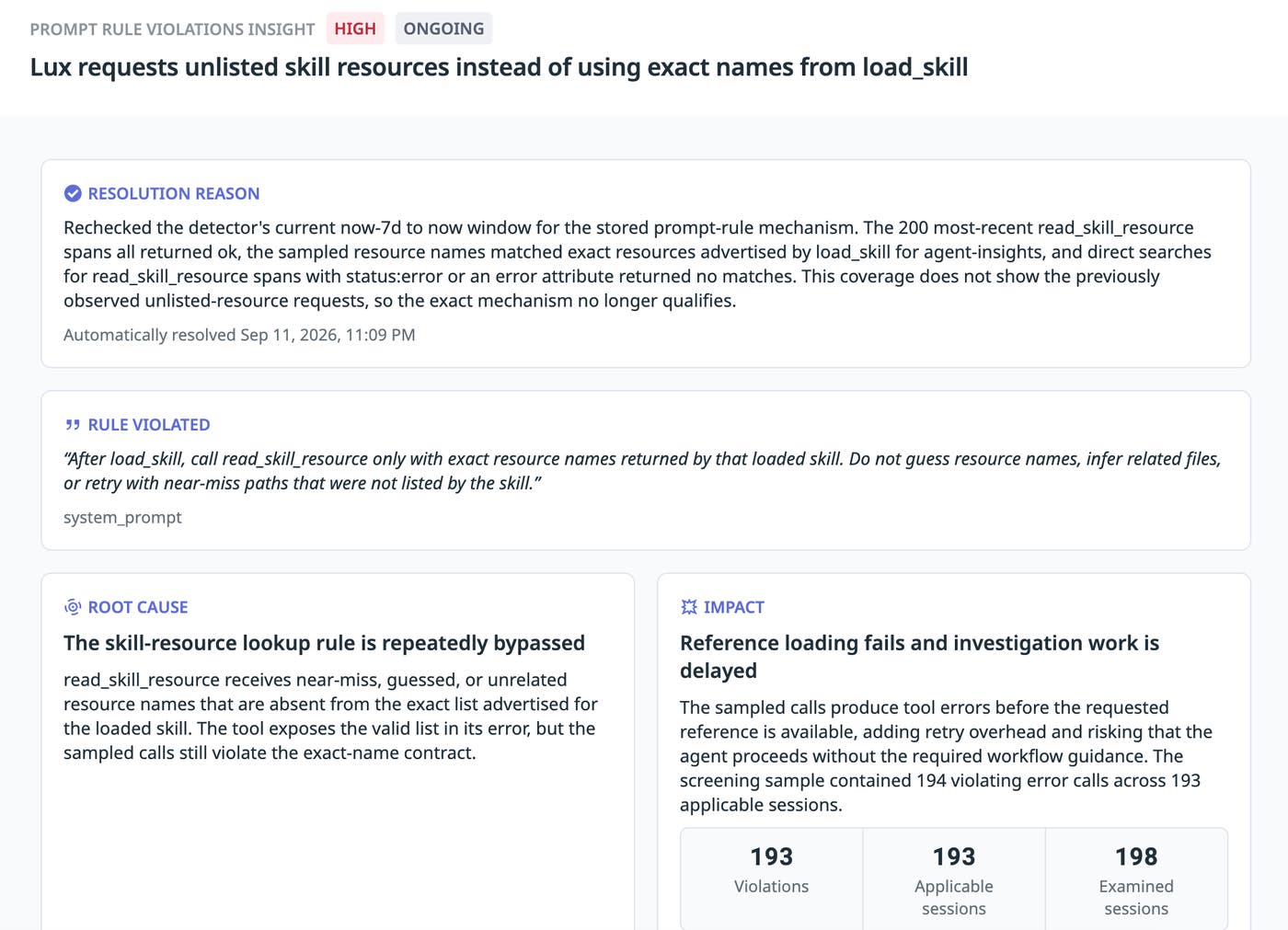
Datadog recommended that we check each requested resource name against the skill loader’s list before attempting to retrieve it. If the name doesn’t match, the tool should return the valid choices so that the agent can correct its request. This change would make the tool enforce a rule already present in the agent’s instructions. To check whether it works, we would replay the affected turns and verify that the agent requests listed resources without repeating failed calls.
Prepare a code change
Once we understand a problem, we can use the evidence and recommendations in an insight to help a coding agent address it. The “Fix with Bits” option lets us pass that information to a coding agent, which can change the code and test the fix. For setup instructions, see the Insights coding-agent workflow.
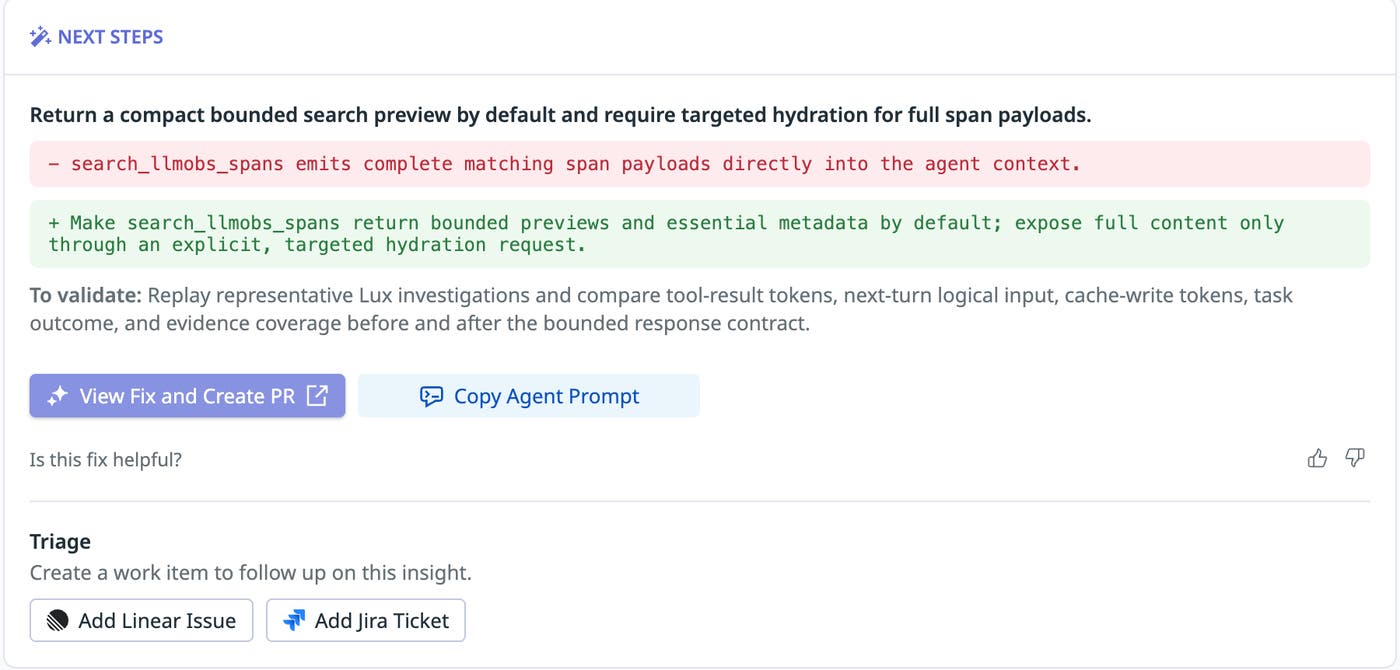
We used the “Fix with Bits” option to address the recurring problem of searches returning too much content. It passed the finding, the recommended change, and the reference to the trace into a coding session. The coding agent then prepared a pull request (PR) to make searches return compact previews.
The proposed change preserved the identifiers needed to retrieve full span content and allowed the agent to request additional pages of results. The PR also included tests to check that previews worked for both newly retrieved and cached results.
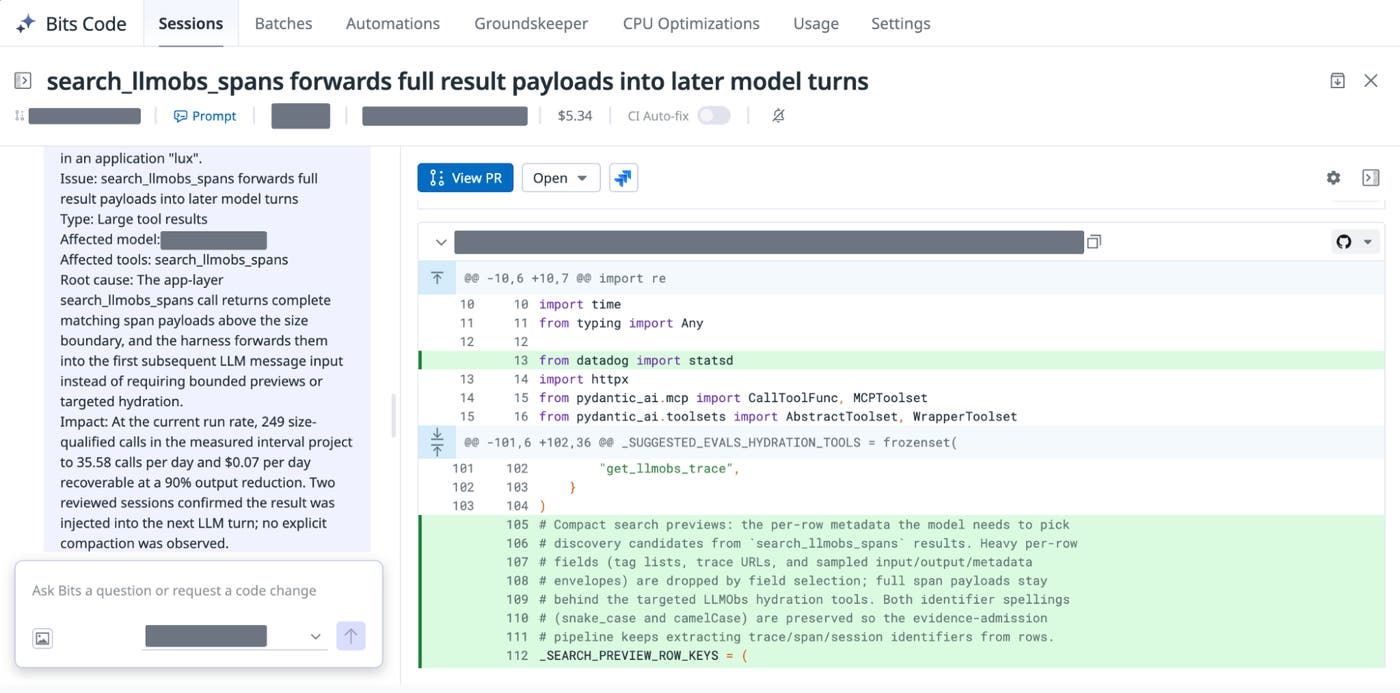
You can follow the same workflow with your own coding agent. Connect it through the Datadog MCP Server or Pup CLI, then ask it to review Insights for your application. Using the evidence and recommendations, the agent can investigate your code, implement and test a fix, and prepare a PR for your review.
Improve your agents faster with Datadog Agent Observability
Insights in Datadog Agent Observability helps our team identify what to change in the agent’s code and instructions. It shows how strategically revising the agent requests helps reuse cached input and prepare a PR to generate smaller search previews. After measuring evidence and estimating impact, we determine how to prioritize these potential changes and how to test them.
With Datadog Agent Observability, you can investigate why your agent costs more than expected or fails to complete tasks. It lets you review the evidence and recommendations in an insight, then implement and test a fix. You can evaluate subsequent runs to check whether the fix worked and see if the problem returns.
Insights in Datadog Agent Observability is now generally available and offers a free tier with up to 40,000 LLM spans per month. Read the Insights documentation to apply this workflow to your own agents.
If you’re new to Datadog, sign up for a 14-day free trial. And for startups, eligible teams can get a year of free Datadog credits. Apply to Datadog for Startups here.
