
Danny Driscoll
Every Kubernetes environment accumulates waste over time. Teams overprovision CPU and memory requests to avoid performance risk, run idle replicas to preserve headroom, and leave Horizontal Pod Autoscalers (HPAs) untouched long after workload behavior has changed. Some of this waste can be addressed at the node level, where Datadog Cluster Autoscaling helps teams rightsize capacity. But the largest savings often sit at the workload level, where requests, limits, and replica counts are configured service by service.
The Datadog Pod Autoscaler continuously rightsizes to help platform and infrastructure teams deploy workload autoscaling safely across a Kubernetes fleet. Teams can apply these recommendations through three rollout paths—in-app setup, GitOps cluster profiles, and AI-assisted onboarding—each designed to fit how they already manage infrastructure. Organizations reduce idle cost at scale while platform teams centrally manage autoscaling without asking every application team to design policies from scratch.
In this post, we’ll explain how you can use Datadog Kubernetes Autoscaling to:
- Activate autoscaling across your fleet from a single page
- Manage autoscaling policy as code with GitOps cluster profiles
- Generate manifests and PRs with AI-assisted onboarding
- Adjust resource requests in place with vertical resizing
Activate autoscaling across your fleet from a single page
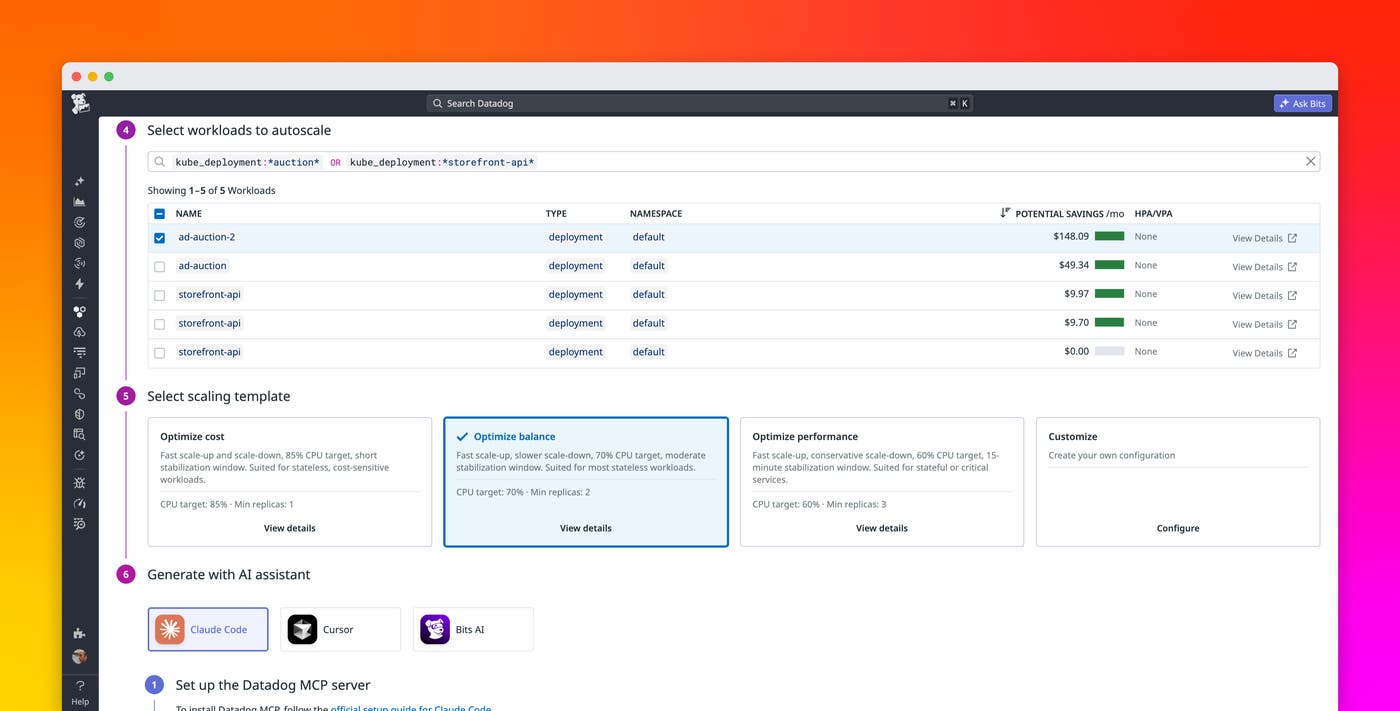
The in-app setup workflow gives platform teams a centralized place to manage autoscaling rollout. From the autoscaling setup page, you can view workloads across your cluster and see which ones are ready for immediate activation and which ones require you to carry over existing autoscaling settings first. For workloads that are ready, you can activate autoscaling in a single click, deploying DatadogPodAutoscalers in bulk from the UI without writing YAML or coordinating team-level handoffs for each service.
The setup page also surfaces estimated idle cost and potential savings, so teams can prioritize rollout targets by cost impact and start with the workloads that need the least review.
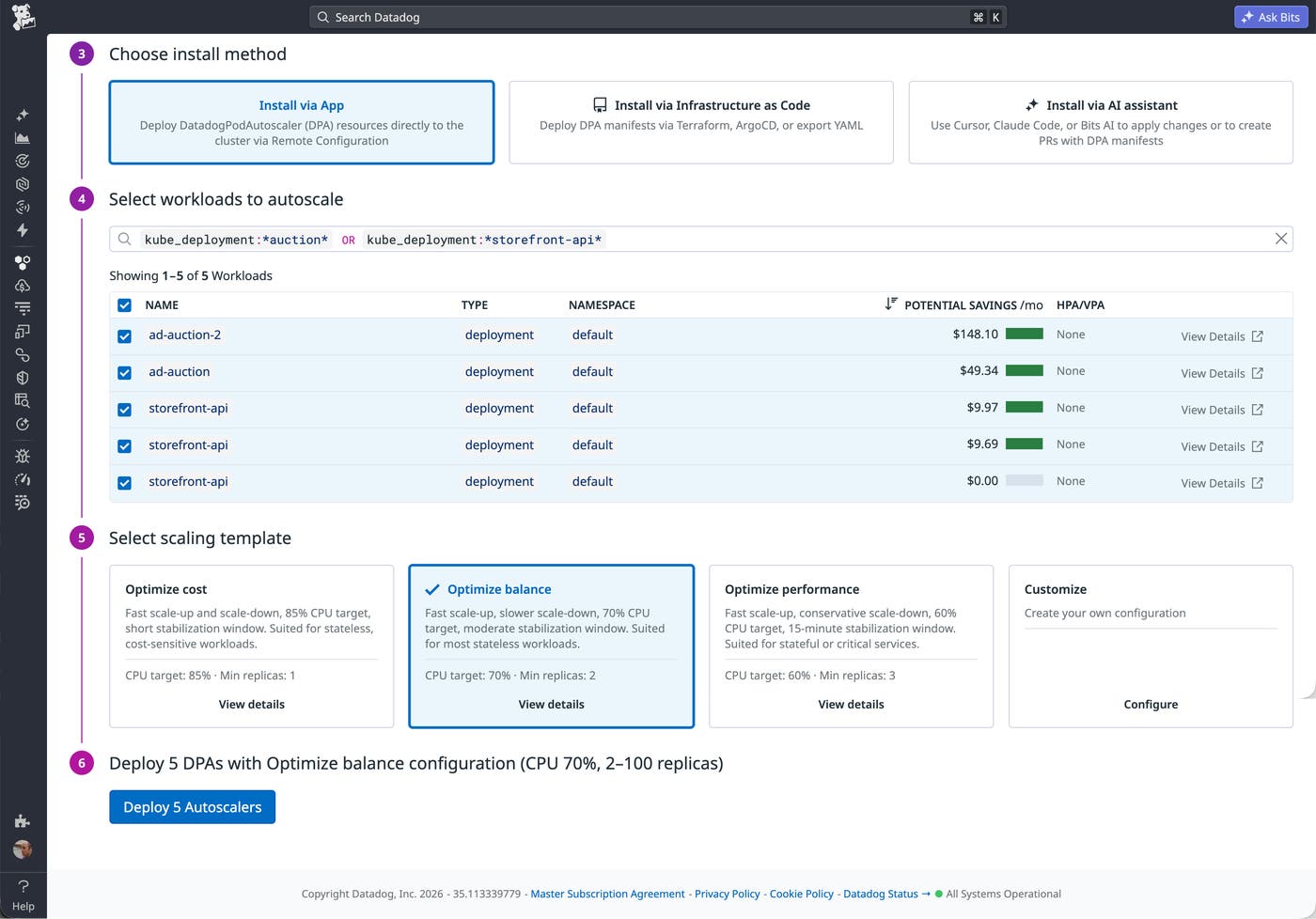
The in-app setup workflow is useful when you want a guided rollout from the Datadog platform. For example, a platform team can start with a cluster, filter to workloads that are ready to autoscale, choose a scaling template, and deploy the generated DatadogPodAutoscaler objects. The result is a faster path from recommendation to rollout, while still giving teams control over which workloads are included.
Manage Datadog Kubernetes Autoscaling policy as code with GitOps cluster profiles
For teams that manage Kubernetes configuration through Git, cluster profiles provide a way to define an autoscaling policy once and apply it consistently across namespaces. You can use one of our three standard workload scaling profiles or define a cluster profile as a DatadogPodAutoscalerClusterProfile custom resource, then add a label to any namespace where you want it applied. The Datadog Cluster Agent detects the label and automatically creates DatadogPodAutoscaler resources for each eligible workload in that namespace, including Deployment and Argo Rollout resources.
Instead of writing a separate autoscaling manifest for every workload, a single profile covers the namespace. If a service within the namespace needs different behavior, you can override the inherited policy or opt it out with a single label.
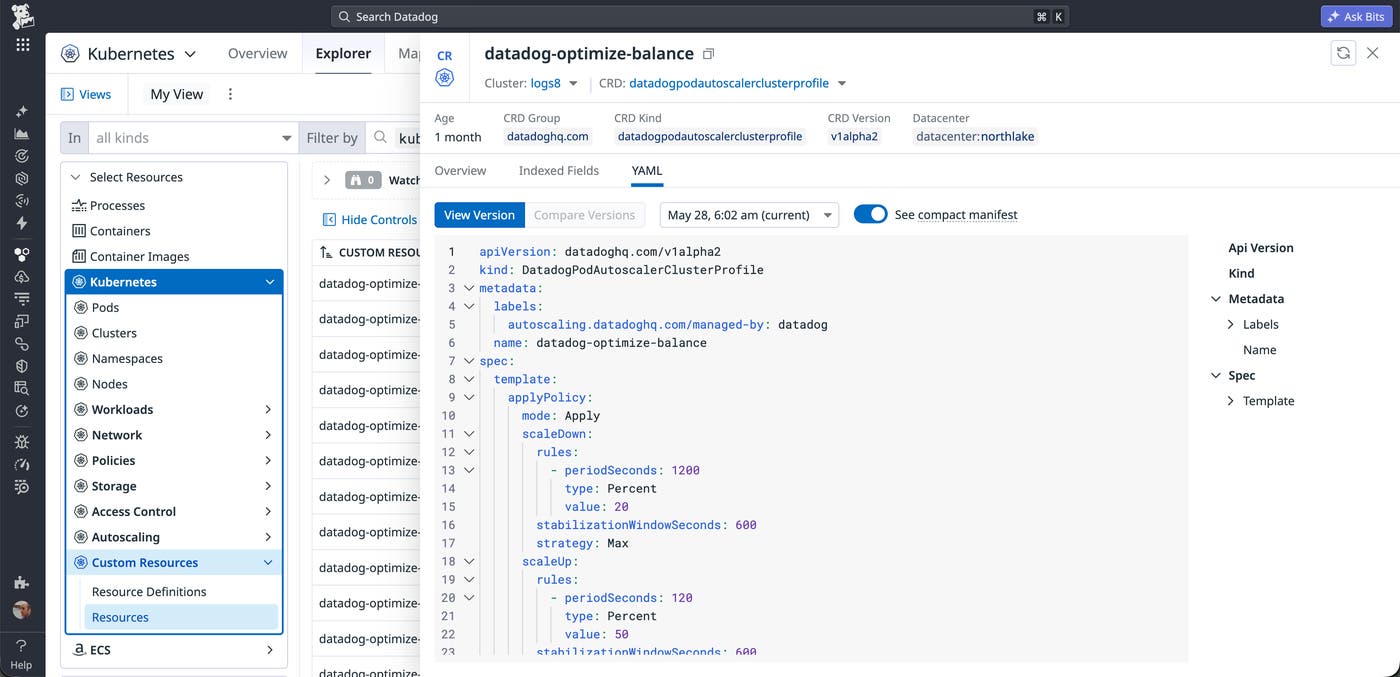
Because the policy and annotations live in Git, adding autoscaling to a namespace follows the same review and approval process as any other infrastructure change. In practice, it can be as simple as a one-line pull request (PR) that applies the relevant label to a namespace definition. GitOps cluster profiles let platform teams expand autoscaling coverage fleet-wide without moving policy decisions out of their existing deployment workflow.
Generate manifests and PRs with AI-assisted onboarding
AI-assisted onboarding helps teams quickly create and manage their first Datadog Pod Autoscaler manifests based on their existing workload context. The workflow runs from the Datadog UI with Bits AI Dev or through the Datadog Model Context Protocol (MCP) Server from Claude, Cursor, Codex, or another MCP-aware client. The assistant inspects your cluster, reviews existing autoscaling resources, and generates DatadogPodAutoscaler manifests that match your environment.
AI assistance is especially useful when a team already uses HPAs, Watermark Pod Autoscalers (WPAs), or Vertical Pod Autoscalers (VPAs) and needs to convert them into equivalent DatadogPodAutoscalers. The assistant can automatically detect those existing resources, translate them into Datadog Kubernetes Autoscaling configuration, and prepare the changes as a draft PR.
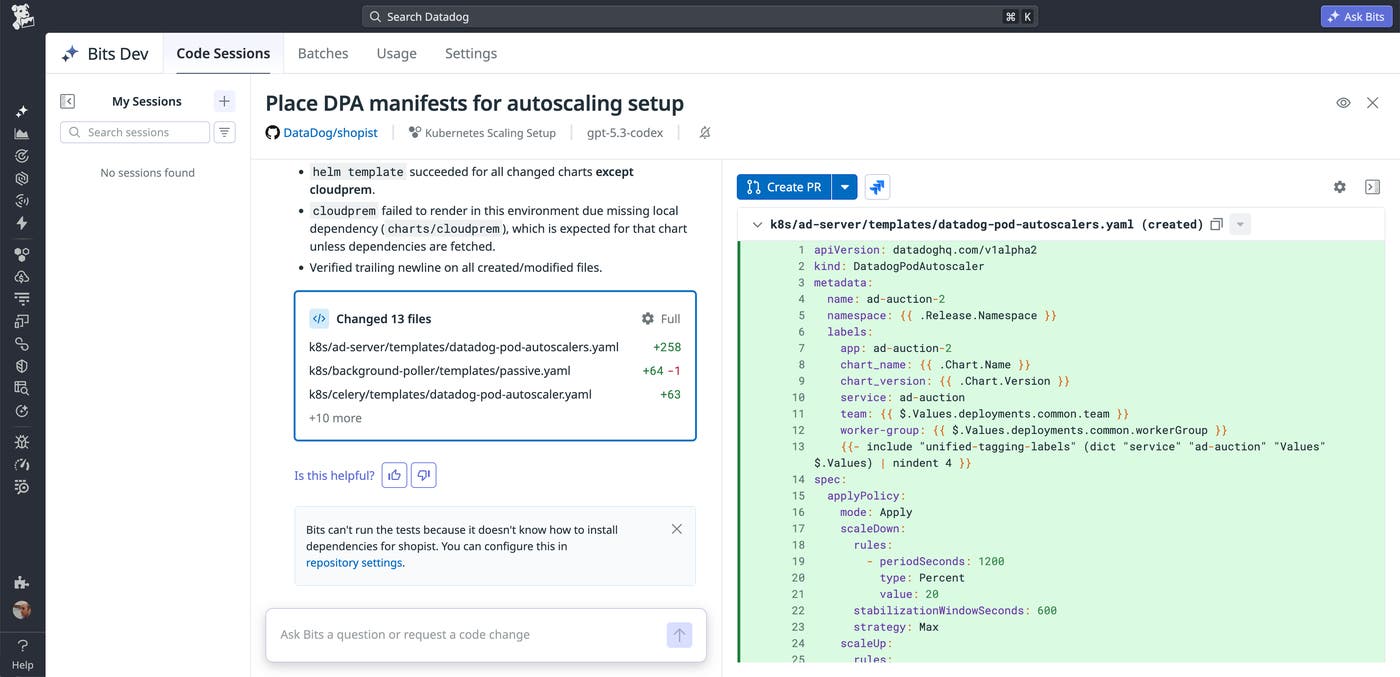
Teams can preserve their Git-based change control, reviewing the generated manifests, adjusting the policy if needed, and merging the approved PR. AI-assisted onboarding gives teams a clear starting point for reviewing autoscaling behavior and guides them through the hardest part of a rollout: opening the first autoscaling PR.
Adjust resource requests in place with vertical resizing
The Datadog Pod Autoscaler supports in-place vertical resizing for containers. Vertical scaling recommendations are valuable because many workloads carry stale CPU and memory requests that no longer reflect production behavior. When resource requests are too high, clusters reserve capacity that applications do not use. When requests are too low, workloads can face performance risk during spikes. Rather than requiring vertical adjustments to go through a pod recreation path, supported CPU and memory request changes can be applied in place to minimize disruption.
In-place vertical resizing complements the onboarding paths described above. Whether you deploy DatadogPodAutoscalers from the UI, through GitOps cluster profiles, or with AI-assisted PRs, the Datadog Pod Autoscaler enables you to resize your resources automatically. As a result, teams can move beyond idle replicas and stale requests while reducing the operational risk of large-scale autoscaling rollout.
Get started with Datadog Kubernetes Autoscaling
Datadog Kubernetes Autoscaling lets platform teams reduce idle costs safely at fleet scale, without requiring application teams to manage their own autoscaling configuration. Whether you activate autoscaling in-app, manage policy as code with GitOps cluster profiles, or generate manifests and PRs with AI-assisted onboarding, each path uses the same stability-first approach to rightsizing workloads. In-place vertical resizing extends that approach to container resource requests, applying changes with less disruption than pod recreation. To get started, see the documentation to learn more about Kubernetes Autoscaling and idle cost and savings estimates. Then enable Kubernetes Autoscaling in the Datadog app.
To start reducing idle cost in your Kubernetes environment, sign up for a free 14-day trial.
