
Hiba Ijjaali
Product Manager

Younes Berradia
Product Manager
Synthetic monitoring helps reliability and engineering teams quickly catch critical issues through proactive monitoring. Investigating long-term trends in performance and availability, though, means tracking down context spread across alerts, test results, and dashboards. The longer that takes, the more time smaller regressions have to worsen and degrade the user experience.
The Datadog Synthetic Monitoring landing page, now available in Preview, brings these signals together into a single, actionable view. Instead of navigating between individual tests and custom dashboards, you can visualize system health, improve test coverage, and investigate issues from one place. By surfacing the most relevant signals automatically, the landing page helps you spot issues earlier and act before they reach users.
In this post, we’ll explore how the Synthetic Monitoring landing page enables you to:
Understand real-time test coverage at a glance
Synthetic tests are only useful if they cover the most critical flows in your app. But the user paths you design might not match the routes that real users take, making it easy for coverage gaps to form.
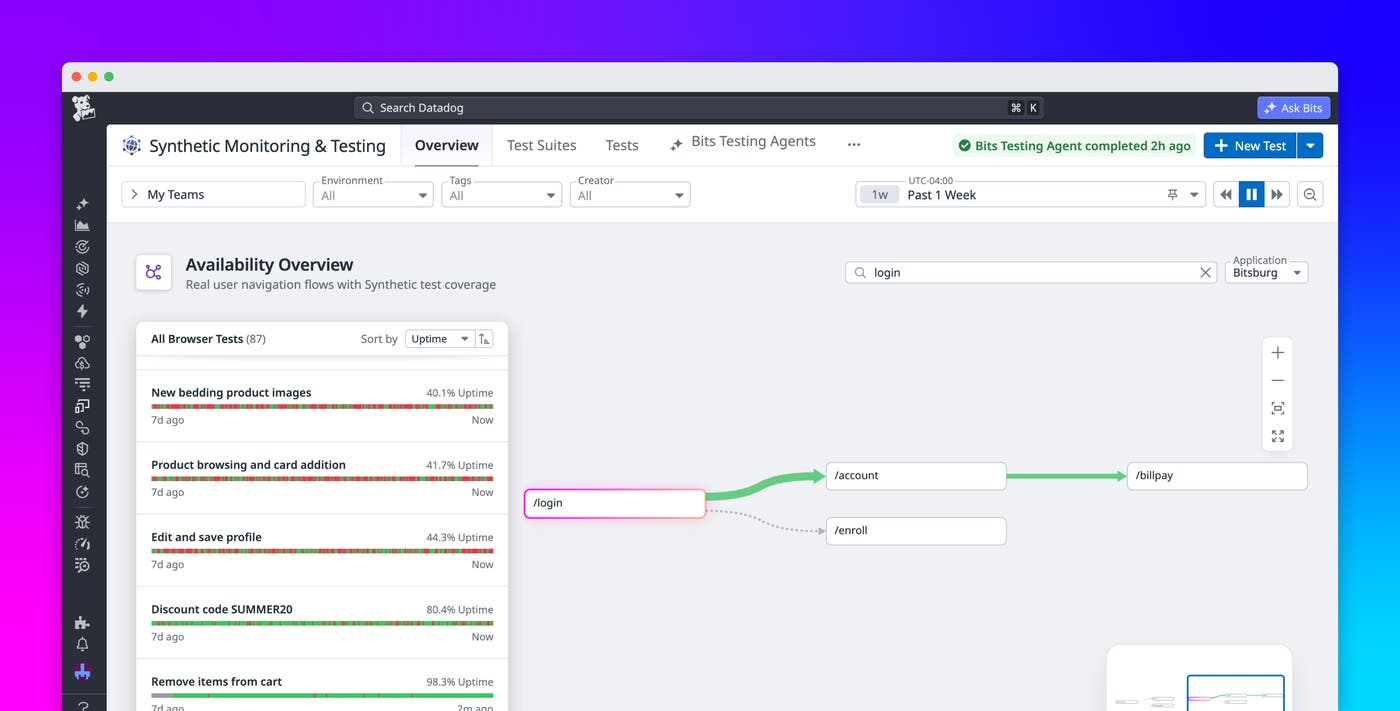
The Synthetic Monitoring landing page helps you determine whether your existing test collection meets your monitoring needs through the Availability Overview map. This map visualizes how users move through frontend applications based on real traffic patterns. You can see the highest-traffic routes and understand how well they are monitored, enabling you to identify blind spots.
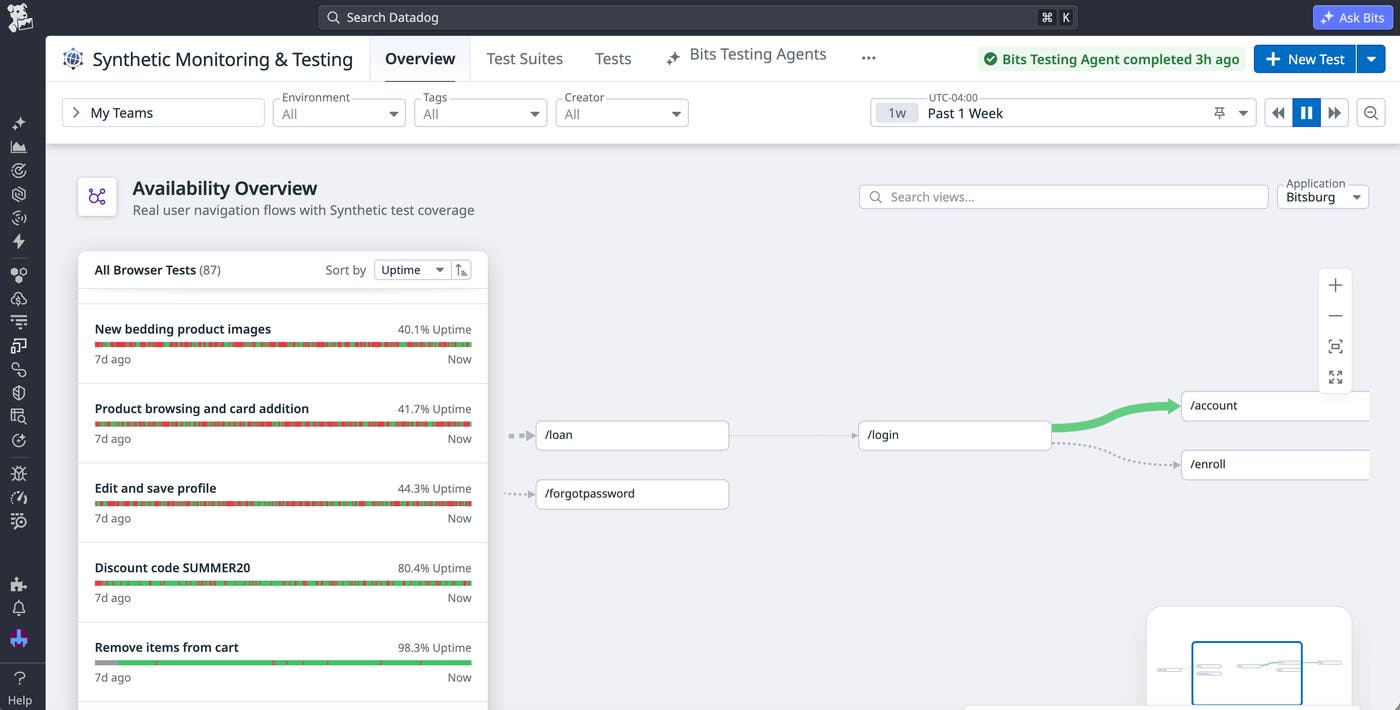
For example, you may have intended for users to sign into their accounts through a widget on your homepage. Through the Availability Overview map, however, you discover that they’re using a separate login page that none of your tests cover.
The Availability Overview map also helps you determine which areas of your app are most in need of optimization. By default, tests within the Availability Overview map are sorted by uptime, so you can quickly identify failure-prone routes that may benefit from more granular testing and troubleshooting. Each test comes with an AI analysis of failed runs so you can understand which issues were encountered.
Click any view in a path to investigate it more deeply. You can also run any of the tests in the Availability Overview list to understand the current state of your system.
Proactively fix issues across your entire stack
Anticipating potential failures within your app often requires correlating signals across multiple layers of your stack. The Synthetic Monitoring landing page simplifies this process with the System Signals view, which combines performance and reliability data across your connectivity, backend, and frontend layers.
The System Signals view surfaces the most critical signals within each category to help you identify weaknesses and bottlenecks throughout your app. The frontend section highlights pages with poor Core Web Vitals or app versions with mobile performance issues, including application not responding (ANR) rates, memory usage, and frozen frame totals. For the backend, you’ll find the services with the slowest HTTP, gRPC, or WebSocket response times. In the connectivity section, you can identify SSL certificates set to expire soon, DNS servers with slow response times, and hosts with high network latency.
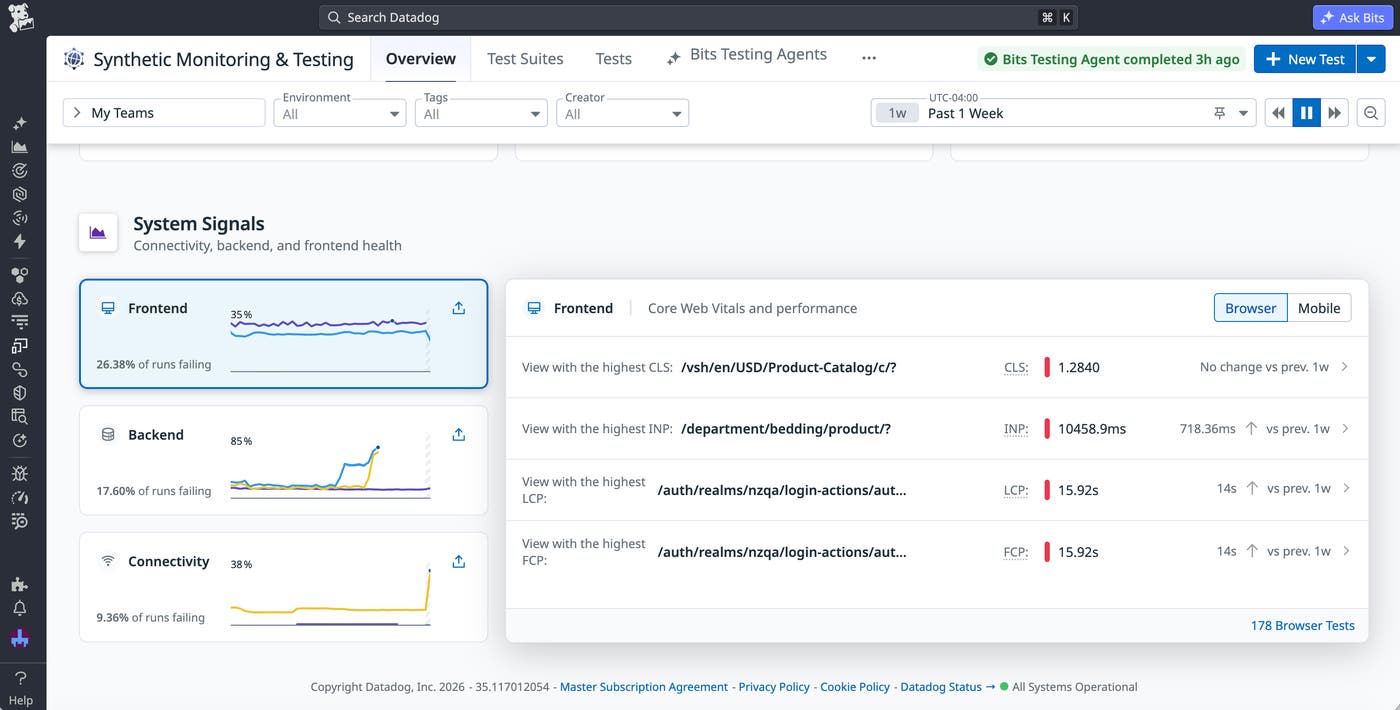
With the information in the System Signals view, you can proactively address issues within your app that could lead to incidents or abandoned sessions. For example, looking at the backend services with the slowest response times can help you spot gradually worsening latency that may degrade the user experience. For each of the backend services surfaced in this section, you can access visualizations that break down different facets of request performance. Let’s say you’re investigating a service with poor HTTP response times. With a single click, you can pivot to its service page, which highlights a problematic endpoint. Viewing traces for requests that involved this endpoint helps you identify a misconfigured header field that’s the likely culprit.
Get started with the Synthetic Monitoring landing page
The Synthetic Monitoring landing page shifts synthetic monitoring from a collection of individual tests to a unified view of system health. By consolidating fragmented dashboards into comprehensive visualizations, highlighting gaps in coverage, and correlating signals across your stack, the landing page gives you the context you need to act before issues reach users.
To get started with the landing page, you can sign up for the Preview. You can also explore the landing page by viewing the Synthetic Monitoring documentation.
Or, if you’re new to Datadog, you can sign up for a 14-day free trial.
