

Eric Metaj
Product Marketing Manager

Mark Azer
Product Manager
Developers and SREs who use Bitbucket Cloud often need to move between their source code, observability data, test results, and security findings to investigate a problem. Connecting an error or slow method to the correct repository, file, and commit takes time. Teams may also discover vulnerabilities, infrastructure misconfigurations, coverage regressions, or flaky tests only after code has progressed further through the software development life cycle, when remediation is more disruptive.
The Bitbucket Cloud Source Code integration connects Bitbucket Cloud repositories to Datadog. It gives each Datadog product access to the source code context it needs to help developers investigate production issues, review automated feedback within pull requests (PRs), and apply quality and security checks before code is merged. In this post, we’ll explain how the integration helps you:
Gain immediate visibility into code health and security
Connecting your Bitbucket Cloud workspace gives Datadog products access to the repositories that your teams select during setup. You can authorize the integration from its Configuration tab, choose the workspaces that you want to connect, and then configure the Datadog capabilities that you plan to use. Installing the integration provides the repository access required by supported features, but it does not enable billable products by default.
With Datadog Code Security configured to the Bitbucket Cloud integration, you can analyze connected repositories for problems in first-party code, open source dependencies, secrets, and infrastructure-as-code configurations. This includes findings from Static Code Analysis (SAST), Software Composition Analysis (SCA), Secret Scanning, and Infrastructure as Code Security. Because Datadog-hosted scans can analyze connected repositories directly, teams can add repository scanning without redesigning their CI pipelines.
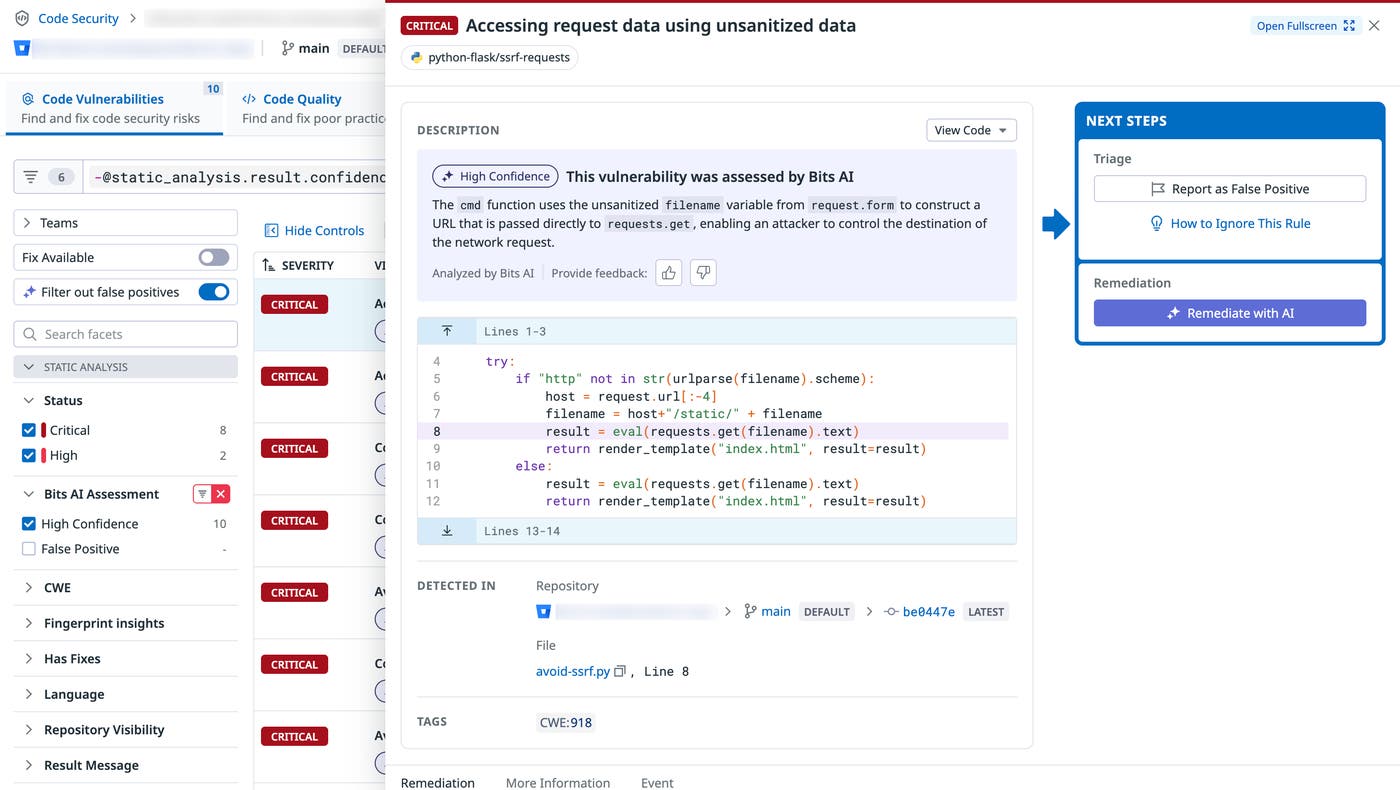
Findings include repository, branch, file path, and line-level context, helping developers understand where a problem originated. Security, platform, and development teams can review the same findings in Datadog and follow links to the relevant code in Bitbucket. This shared context helps teams prioritize the repositories and services that require attention while giving developers a direct path to remediation.
Accelerate troubleshooting with code-aware APM
Source code context is most useful when Datadog can connect a running service to the exact repository and commit that produced it. With Source Code Integration service mapping, you can tag application telemetry data with a Bitbucket repository URL and commit SHA. Once the telemetry is associated with a repository and commit, Datadog can connect stack frames, errors, and performance data to the relevant source code.
The Bitbucket Cloud Source Code integration then provides contextual snippets while you investigate issues in APM Traces, Error Tracking, Continuous Profiler, and other Datadog products. For example, when you select an Error Tracking issue, you can inspect the code associated with a stack frame without manually searching Bitbucket for its filename and function. You can also follow a link from Datadog to the corresponding file or commit when you need the complete repository context.
This workflow shortens the path from observing an error to identifying the code that caused it. An engineer can begin with a trace or profile, inspect a representative error or hot path, and move directly to the affected source file. For more examples of where source code context appears, see our Source Code Integration features documentation.
Automate code reviews with PR feedback
Production troubleshooting can reveal where code failed, but teams can reduce remediation work by identifying problems during code review. The Bitbucket Cloud Source Code integration enables supported Datadog products to post automated feedback on Bitbucket PRs, which places test, quality, and security information next to the proposed changes.
Code Coverage can summarize the reach of your tests, while Test Optimization can report failed or flaky tests to help reviewers distinguish deterministic failures from tests whose results vary across executions. Code Security can flag new vulnerabilities, code quality violations, exposed secrets, and infrastructure-as-code misconfigurations introduced by the PR.
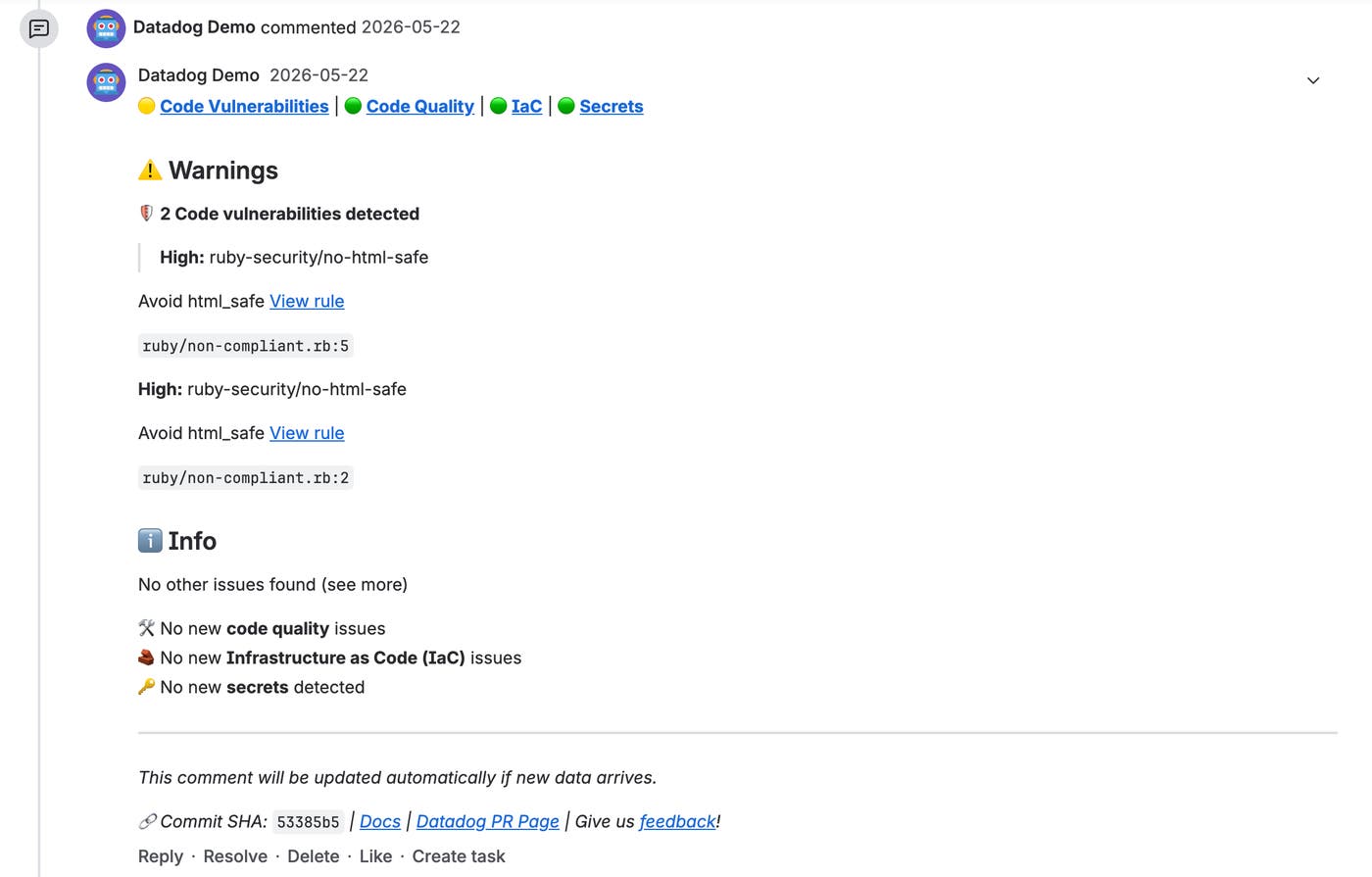
Depending on the type of finding, Datadog can add a summary comment for the PR or place targeted feedback on the affected lines in the diff. Inline comments give authors enough context to understand which change triggered a finding.
Each comment can link to more detailed findings or test runs in Datadog. Reviewers can use the PR feedback for an initial assessment, then open the associated Datadog view when they need test history, stack traces, severity information, or other supporting data. This keeps routine feedback close to the code while preserving the deeper investigation context in Datadog.
Connect your Bitbucket repositories to Datadog
The Bitbucket Cloud Source Code integration brings repository context into the Datadog workflows that developers, SREs, and security teams already use. By connecting Bitbucket Cloud repositories, teams can investigate production issues with relevant source code, surface test and security feedback during code review, and apply centrally managed standards before changes are merged.
To get started, open the Bitbucket Cloud Source Code integration configuration, connect your Bitbucket account, and select the workspaces and repositories that you want to authorize. Our integration is generally available to Bitbucket Cloud Premium users, with preview availability for Standard users coming soon. For more information, read the integration documentation and the Source Code Integration documentation. If you’re new to Datadog, sign up for a 14-day free trial.
