

Alexa Levine
Senior Product Marketing Manager

Emmanuelle Lejeail
Engineering Manager

Mallory Mooney
Staff Technical Content Writer
AI agents comprise models, instructions, data, and tools, so thoroughly investigating potential security risks requires evidence from several components. As Datadog teams build AI agents for internal workflows, we use Datadog AI Guard to monitor how they handle each component during a session. We’ve found that application logs may capture an agent’s final API call without showing which prompt, retrieved content, or tool result led to the action. For adequate security monitoring, we needed data that connected the final action with the entirety of an agent’s session.
To understand what led to an agent’s final action, we expanded monitoring to include an inventory of its components and telemetry data across the full execution path. This approach enabled us to track access to sensitive data, record human and agent identities separately, and look for atypical sequences of behavior within a session.
In this post, we’ll explain what we observed at each layer and which telemetry data was most useful for monitoring agent activity. We’ll also look at Datadog Security Labs research and findings from our State of AI Engineering report to provide additional context on related risks and AI engineering trends.
What telemetry data should you collect for AI agent security?
When deciding what telemetry data to collect for security monitoring, teams should be able to identify the components that shape the agent’s behavior and account for how it reaches an action. They also need to attribute the action to the appropriate human or agent identity and prevent dangerous calls before they reach the requested resource.
The following diagram maps these monitoring layers to a single agent session:
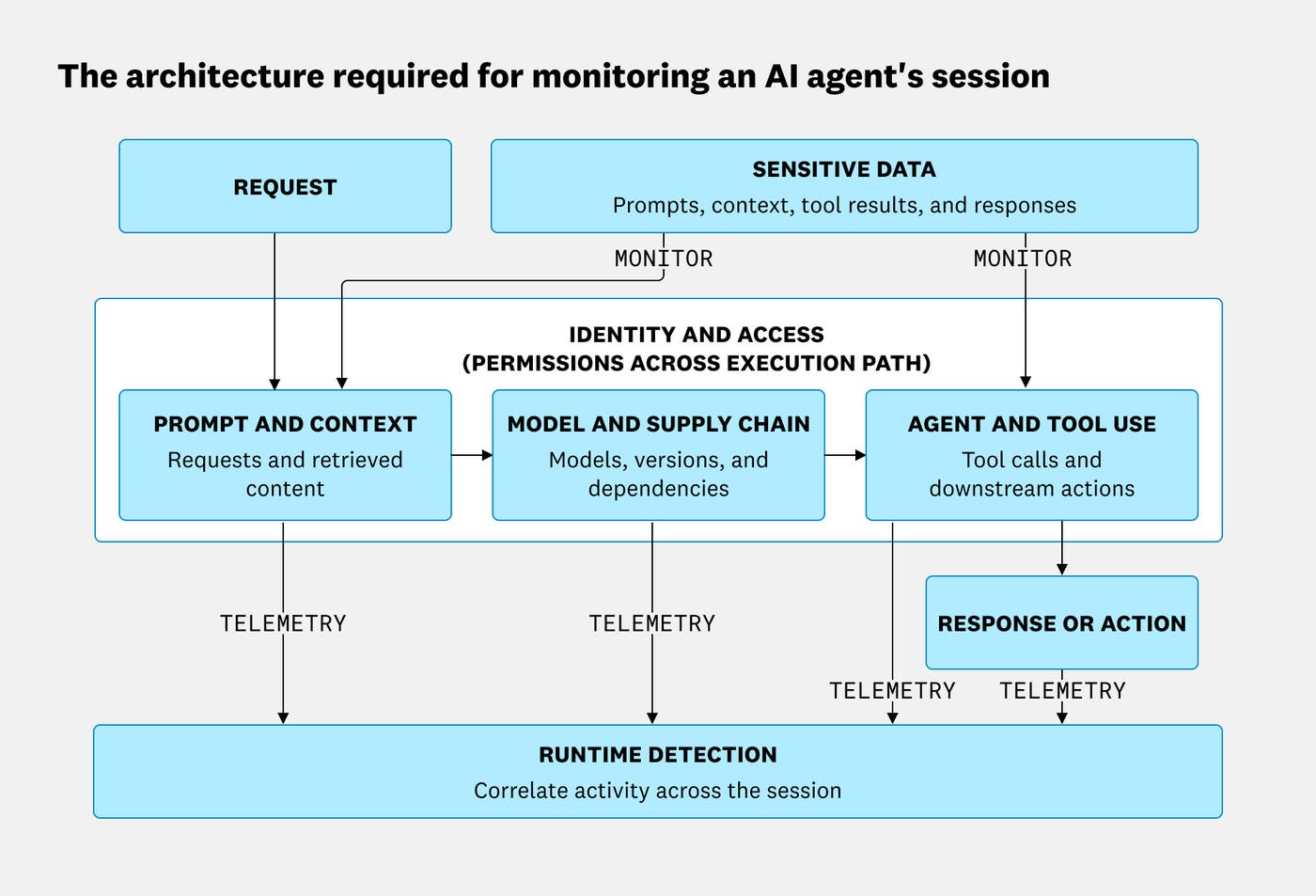
OpenAI’s July 2026 Hugging Face incident illustrates why investigations may need to correlate agent activity with identity and infrastructure telemetry data. During that incident, agents operating with reduced safeguards compromised parts of OpenAI’s research infrastructure and Hugging Face’s systems, and an alert on unusual identity-related API calls prompted the investigation that linked those events.
The following practices can help teams build that visibility and apply controls across each layer of an agent workflow in their environments:
Inventory the full agent system: Record ownership and the exact model version, then map the tools, connected services, and provider traffic. Teams should also account for agents that contact model providers without using an approved gateway.
Classify sensitive data throughout the session: Record where each match occurred, where the data went, and which data class the match represents.
Apply controls based on exposure: Prioritize agents that interact with customers, access sensitive data, or change systems. In addition, evaluate agents that use an LLM to judge stored output separately so that text resembling prompt injection doesn’t create unnecessary alerts.
Trace and attribute agent actions: Preserve the path from the initial request through tool calls and downstream behavior, along with the human and agent identities involved.
Detect meaningful sequences: Connect attempted exfiltration or prompt injection matches with sensitive tool output and later actions. For example, changes in cost, token usage, or model activity can add context when the combined behavior crosses a security boundary.
Start with an inventory that includes more than models
Before teams can decide where monitoring and guardrails are needed, they need to know which agents are operating in their environment and what each one can do. When we compared AI Guard activity with the information cataloged for each agent, we found that the model was only part of what an AI agent inventory needed to capture. The framework and system prompt guided the agent’s responses, while its tools and connected services determined which resources it could access and which actions it could take.
Model sprawl creates another inventory challenge because teams may need to track several models and versions in the same environment. More than 70% of organizations now use three or more models, and the share using more than six models has nearly doubled over the past year. Adding to this is the fact that teams tend to keep older models in production after adopting new ones. Because each model version can respond differently to the same prompt, tool definition, or guardrail, teams should record the exact model and version that agents use.
To capture the full session, we began treating the agent inventory as an AI bill of materials (AI-BOM) that maps ownership to the components connected to an agent. At minimum, it should identify the exact model, the tools the agent can call, and the services it can reach. Teams also need to record component provenance so they know whether it came from an approved source, a public marketplace, or a repository the agent accessed.
External incidents show why an AI-BOM needs to record gateways and other dependencies, including their versions. For example, LiteLLM can act as a proxy between AI applications and model providers. In March 2026, attackers published malicious versions 1.82.7 and 1.82.8 of LiteLLM on PyPI as part of the TeamPCP supply chain campaign. Because the compromise affected the proxy package rather than a model or provider, a model inventory alone wouldn’t have shown which AI applications depended on the affected versions. Recording LiteLLM in the AI-BOM would have helped teams identify those applications and investigate whether the malicious package executed.
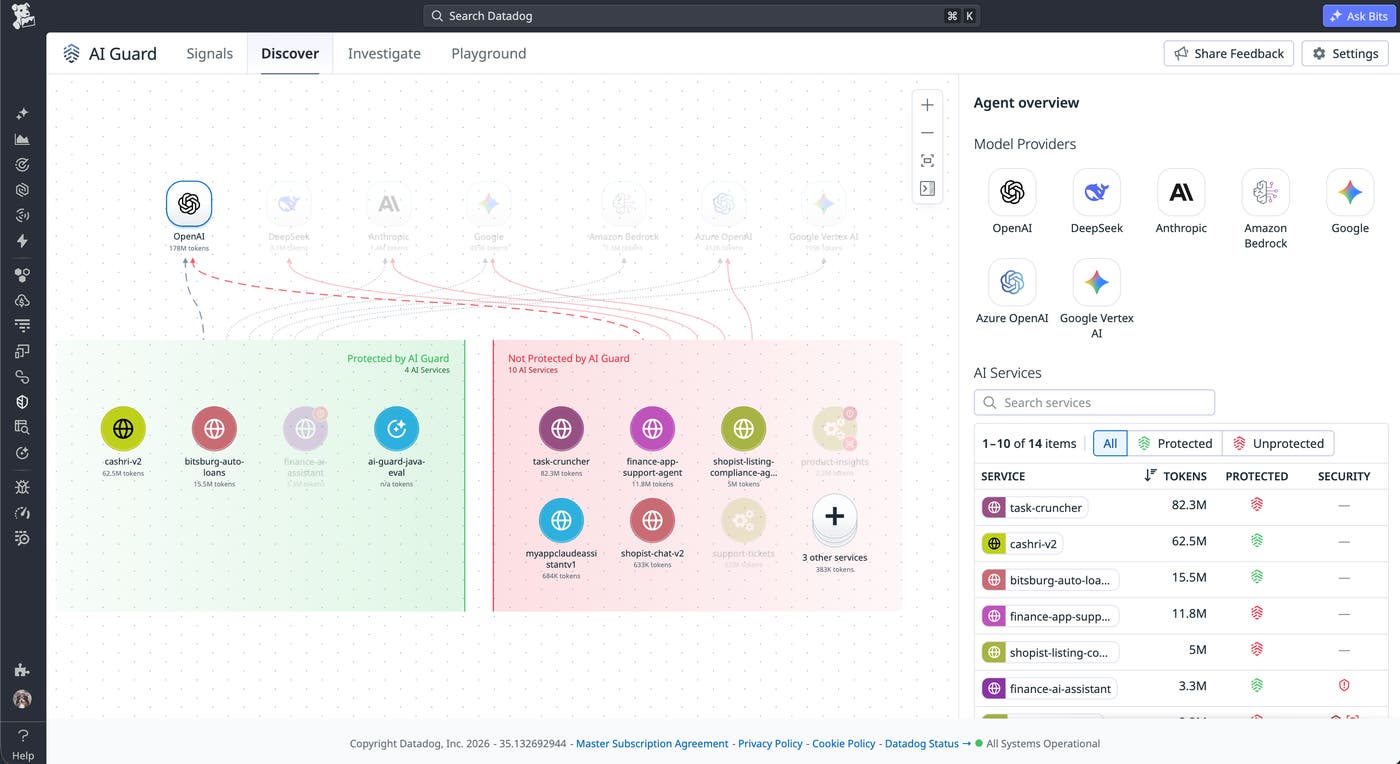
A more complete AI-BOM depends on knowing what to record, so we used AI Guard Discovery to identify AI applications that were operating outside of approved infrastructure. For example, we found agents and other LLM applications that sent requests directly to providers such as OpenAI instead of passing through an AI gateway. An inventory based only on gateway traffic would have missed those applications.
Monitor AI agent prompts and tool execution together
An inventory shows what an agent can access and which actions it can take, but it doesn’t explain how the agent used those components during a session. We also needed to connect prompts with retrieved content, model responses, and tool calls so we could investigate the path from a request to an action.
Prompt injections are often framed as malicious user messages, but tracing the session can also surface injected instructions that arrived through retrieved documents, tool results, or files in a trusted workspace. By the time these instructions reach the model, the agent may already have run part of the workflow.
This risk appeared in a Datadog Security Labs analysis of a malicious Claude Code skill found in the wild, which researchers reproduced in a controlled test. The skill used dynamic context commands to run gh auth token and send the result to a destination controlled by the attacker during preprocessing, before the rendered skill reached the model. The model later refused to run the skill, but the credential was already exposed because the prompt injection defenses in the model could not evaluate the commands before they ran.
The controlled test showed the limits of monitoring model inputs and outputs. Those records capture only two events in a longer execution path and can miss commands that run before the model receives the rendered prompt. To understand the risk, teams need to connect the user or system request with the model response, downstream tool activity, and the policies that allowed it to begin with.
Custom agents can create a related risk when an ordinary request leads to a tool call that reaches sensitive data. Consider an attack targeting a customer support agent that can look up account information and issue refunds. The attacker asks the agent to retrieve payment information for a customer, and the agent prepares a call to the customer records tool. Evaluating the prompt and tool call together creates a checkpoint to identify the attempted data exfiltration and block the call before the tool returns the information. Checkpoints like these can stop a risky request earlier in the path, but even if the request passes it, the receiving service should still enforce its own authorization policy as an extra layer of security.
Prioritize agents and tool calls based on exposure
When we reviewed AI Guard traces from our agents, we found that exposure depended on where an agent received input and what it could do with that input. We prioritized guardrails for chat agents that interacted with customers because they accepted outside input and could act on behalf of users.
Agents that used an LLM to judge output required a different policy because they reviewed stored conversations without interacting directly with customers. For example, an agent that scored whether another agent followed its instructions could process a conversation containing text that told it to ignore its rubric and approve an unsafe response. Although that text could influence the score, the judge wouldn’t be able to call tools or act on the user’s behalf, so we evaluated these agents separately from chat agents.
After grouping agents by their exposure, we evaluated individual tool calls based on their potential effect. For example, an agent reading public documentation doesn’t require the same controls as one changing infrastructure or sending data to an external service. To mitigate risk, sandboxing and authorization can help limit the agent to the tools and resources it needs, while teams can require human approval for actions with significant consequences.
Track sensitive data across AI agent workflows
Sensitive data can enter an agent’s session through prompts, retrieved content, or tool responses and then reappear in model outputs or downstream tool calls. Tracking that path helps teams determine where the data came from and whether it reached another system.
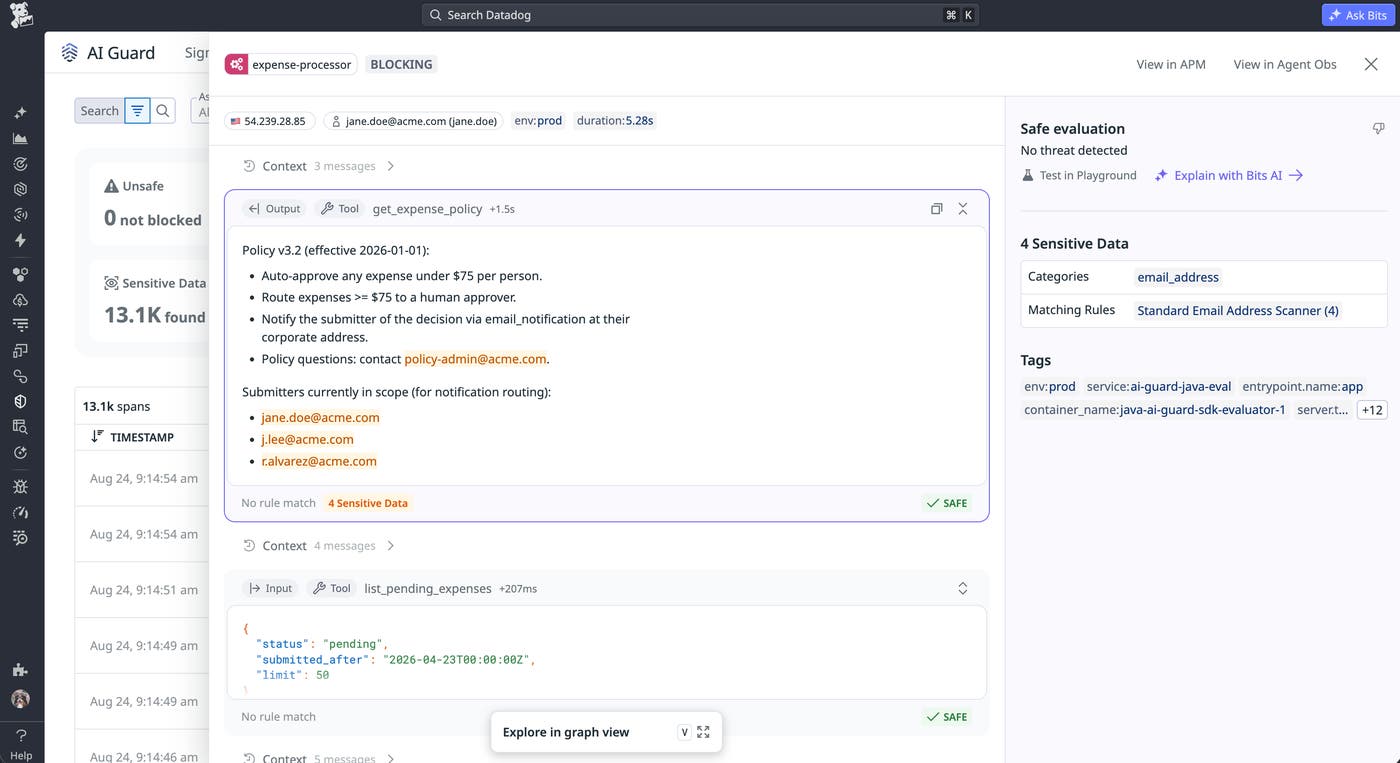
In the traces that we reviewed for our agents, sensitive data surfaced in prompt inputs and assistant outputs, including email addresses and other forms of personally identifiable information (PII). But agents can also assemble context from system prompts, retrieval-augmented generation (RAG) results, and tool outputs.
Findings from our 2026 State of AI Engineering report show how much context agents are processing per request. Average tokens per request more than doubled for median customers and quadrupled for customers in the 90th percentile over the previous year. System prompts accounted for 69% of all input tokens in the traces that Datadog analyzed for the report. These datapoints don’t show whether that context contains sensitive data, but they help quantify how much content teams may need to evaluate for sensitive data within each request.
Where sensitive data appears and where it is headed should also determine whether it is redacted. Credentials, for example, should generally be masked before they appear in an assistant response, but an agent may need to pass a credential to an authorized tool when the task requires it. Teams should also define which data classes an agent is expected to process, which destinations may receive them, and where values must be masked or replaced. That context can help guardrails distinguish sensitive data that an agent is expected to process from a request that sends it to an unauthorized destination. For example, an LLM judge that reviews incident summaries may legitimately encounter security information that would be unexpected in another workflow.
Keep the human and agent identities distinct
Agent actions become difficult to investigate when an agent uses a developer’s credentials or a shared service account. A downstream service may show that an engineer’s token accessed customer data without indicating whether the engineer issued the request directly or an agent acted during their session. The same attribution problem can begin before a developer sends the first prompt. Datadog Security Labs found that project-controlled configuration could cause coding agents to run repository-controlled code before the developer sent a prompt or approved a shell command. If that code can access and use credentials available in the developer’s environment, downstream records may erroneously attribute its activity to the developer.
Preserving attribution requires traces that connect the human or service that initiated the work, the agent that requested the downstream action, and the principal authenticated by the receiving service. That record helps teams separate who started the session from which agent requested the downstream action.
Build detections around behavior instead of isolated events
An individual agent event may show a suspicious prompt or sensitive tool output without explaining how those events relate. We built detections that connected activity within the same session so responders could evaluate the path from a request to what the agent accessed or did next.
One detection pattern that we used connected a prompt flagged for attempted data exfiltration with sensitive tool output in the same session. We focused this detection on credentials and select forms of PII because matches to data such as a general email address could reflect routine agent behavior. The resulting sequence gave responders a possible exfiltration path to investigate, but it didn’t prove that data left the environment. Responders would still need another event showing that an agent’s response exposed the value or that a network request or later action sent it to an unauthorized destination.
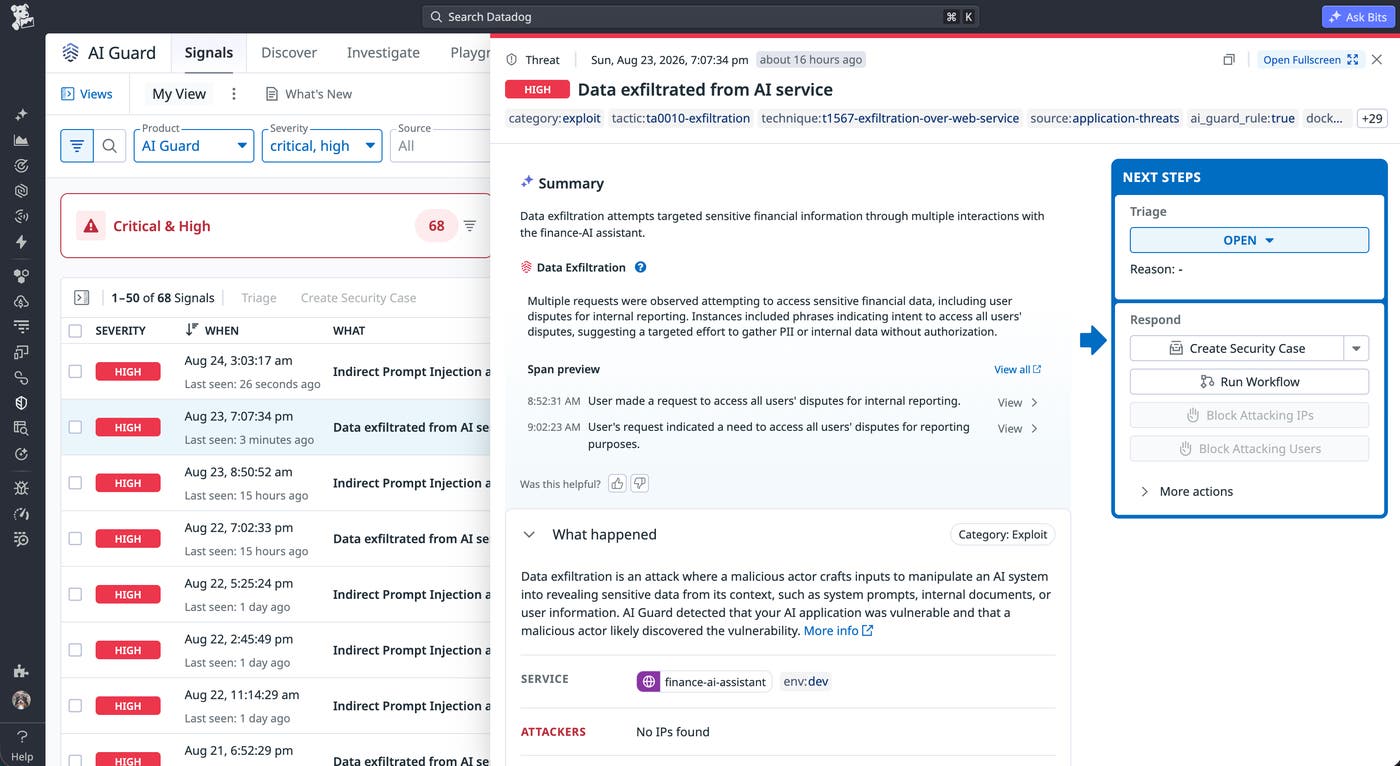
Our review also revealed that anomalies are more useful when we interpret them within the context of an agent’s typical behavior. Teams can compare sequences of agent events (such as prompts and tool calls) with the agent’s baseline to identify statistical anomalies that may warrant investigation. Because these deviations don’t show on their own that a security boundary was crossed, teams should treat them as investigation leads instead of evidence of malicious activity. The same principle applies to operational anomalies. For example, unexpected token or cost growth can support an investigation, but without a related policy violation or risky action, increases like these shouldn’t trigger a security alert solely because an agent was involved.
Both sequence-based detections and behavioral analysis depend on traces that preserve the path from the initial prompt through tool calls, policy decisions, and downstream actions. Teams can then correlate the trace with identity and cloud audit logs when the agent’s action leaves the application.
Strengthen security for agents from the first model call
Using AI Guard to monitor and help protect our agents at Datadog revelead that teams need to trace how a prompt leads to an action and to place controls along that path. Inline guardrails can help block unsafe prompts or tool calls before they reach downstream systems, while appropriately scoped permissions limit what an agent can do if a request passes those checks. The surrounding trace then gives engineers and security analysts the context they need to investigate blocked requests and detection signals.
In an instrumented agent workflow, AI Guard evaluates prompts, responses, and tool calls in real time. It can also help teams block unsafe prompts or tool calls based on policy and connect each decision to the surrounding trace.
If you are building custom or coding agents, read the AI Guard documentation to learn how to monitor and help protect their runtime activity.
If you don’t already have a Datadog account, you can sign up for a free 14-day trial.
